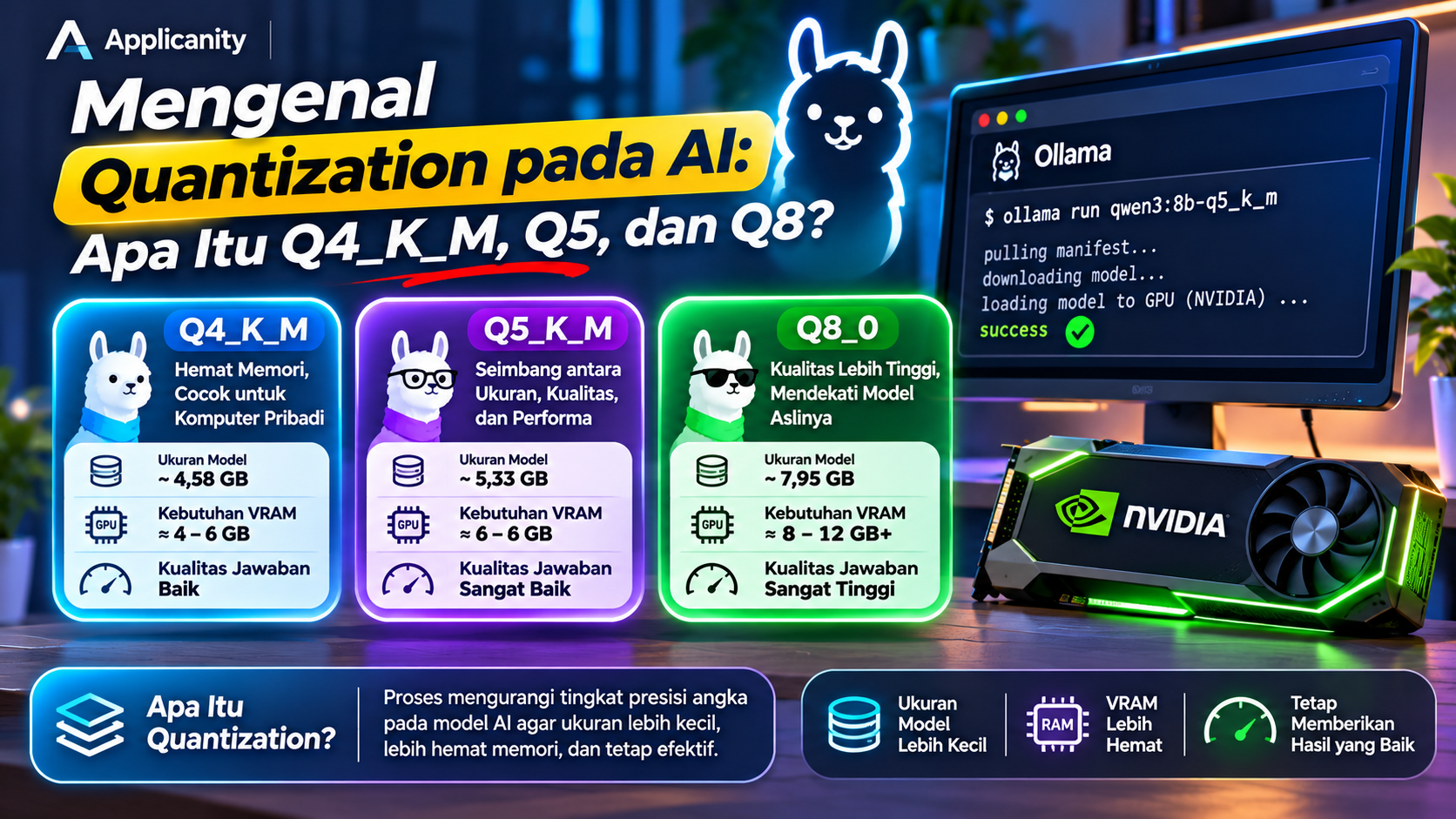
Understanding AI Quantization: What Are Q4_K_M, Q5, and Q8?
The development of Artificial Intelligence (AI) has made it increasingly common for people to run Large Language Models (LLMs) locally on their own computers. With tools such as Ollama, LM Studio, and llama.cpp, users can run AI models without always relying on cloud-based services.
However, when downloading an AI model, you may notice several available versions with labels such as Q4_K_M, Q5_K_M, Q6_K, and Q8_0.
Although these versions may come from the same original model, they can have different file sizes, memory requirements, and output quality.
These differences are related to a technique called quantization.
What exactly is quantization? Why are there Q4, Q5, and Q8 versions? Does a higher number always mean a better model? And which version should you choose for your computer?
Let's explore these questions in simple terms.
What Is Quantization in AI?
Quantization is a process of reducing the numerical precision used to represent the parameters or weights of an AI model.
To understand this concept, it helps to know that AI models contain large numbers of parameters. These parameters are numerical values that help the model recognize patterns, understand context, and generate responses.
Model weights can be stored using different numerical formats, such as 16-bit or 32-bit representations. Higher-precision formats generally require more storage and memory.
Quantization converts these numerical values into representations that use fewer bits. The main goal is to reduce the model's size and memory requirements, making it easier to run AI models on devices with limited hardware resources.
Imagine saving a measurement:
-
A high-precision value can preserve more numerical detail.
-
A lower-precision value uses a simpler representation.
-
The simpler representation requires less storage, but some numerical detail may be lost.
A similar process happens to AI model weights. When a model is quantized, small numerical differences may occur. These changes can sometimes affect the quality of the model's output.
In simple terms, quantization is about finding a balance between model size, memory usage, performance, and output quality.
Why Is Quantization Important?
One of the biggest challenges of running AI locally is hardware requirements.
Large AI models require substantial memory, especially when their weights need to be loaded into a GPU. Not every computer has a GPU with enough VRAM to handle these models.
For example, an 8-billion-parameter model stored in FP16 requires approximately 16 GB just for its weights in a simplified theoretical calculation. In practice, total memory usage can be higher because the application also needs memory for context, cache, and other computations.
Quantization can significantly reduce the storage required for model weights.
Its main benefits include:
-
Smaller file sizes. Models require less disk space.
-
Lower RAM and VRAM requirements. Models that previously did not fit into memory may become usable on more affordable computers.
-
Access to larger models. Users can experiment with models containing more parameters without needing server-class hardware.
-
Potentially faster inference. Smaller models may generate responses faster because less data needs to be transferred from memory.
However, quantization does not always make a model faster. Performance also depends on the GPU, CPU, memory bandwidth, software implementation, and context length. Some low-bit formats may introduce additional computation that affects speed.
Understanding Q4, Q5, and Q8
When you see labels such as Q4_K_M or Q8_0, the letter Q refers to quantization, while the number indicates the general bit-width group used to represent the model's weights.
In simple terms:
-
Q4: uses a representation group based on approximately 4 bits.
-
Q5: uses a representation group based on approximately 5 bits.
-
Q8: uses a representation group based on approximately 8 bits.
More bits allow a wider range of numerical values to be represented. This generally helps preserve more information from the original model.
However, these labels do not mean that every value in the model file uses exactly 4, 5, or 8 bits. Modern quantization formats use blocks, scaling information, and additional metadata. As a result, the actual storage requirement is usually higher than the basic bit-width might suggest.
Let's look at the most common formats.
1. Q4_K_M: A Balanced Choice for Personal Computers
Q4_K_M is one of the most popular quantization formats for running LLMs locally.
It belongs to the K-quant family used in the llama.cpp and GGUF ecosystem. Unlike simpler quantization approaches, K-quants use grouped weights and additional scaling information to represent numerical values more efficiently.
The name can be understood as follows:
-
Q4: a quantization group based on approximately 4 bits.
-
K: part of the K-quant family.
-
M: the Medium variant.
The M label does not mean that every weight uses the same precision. In llama.cpp implementations, some model tensors considered more sensitive can be assigned higher precision to help preserve output quality.
Advantages of Q4_K_M
-
Relatively small model size.
-
Lower VRAM requirements than Q5 or Q8.
-
Generally good output quality for many everyday tasks.
-
Suitable for personal computers and GPUs with limited memory.
Disadvantages of Q4_K_M
-
More weight information is compressed compared with Q5 or Q8.
-
Output quality may decrease on certain tasks.
-
Models that rely heavily on precise instructions or complex reasoning may show differences.
Q4_K_M is often a practical starting point for users who want to run local AI while keeping memory usage under control.
2. Q5 and Q5_K_M: A Balance Between Size and Quality
Q5 uses a representation group based on approximately 5 bits. One commonly used format in the K-quant family is Q5_K_M.
Compared with Q4_K_M, Q5_K_M generally requires more storage and memory. In return, it can preserve model weight information more accurately.
Advantages of Q5_K_M
-
Output quality is generally closer to higher-precision versions.
-
Suitable for tasks that benefit from more consistent responses.
-
A good option when sufficient VRAM is available.
-
Offers an attractive balance between model size and quality.
Disadvantages of Q5_K_M
-
Larger file size than Q4_K_M.
-
Higher RAM or VRAM requirements.
-
Does not always provide better inference speed than Q4_K_M.
Q5_K_M is a good option for users who want better quality without moving to a model as large as Q8_0.
Keep in mind that Q5 does not always mean Q5_K_M. Several variants exist, including Q5_0, Q5_1, Q5_K_S, and Q5_K_M. Each has different storage methods and characteristics.
3. Q8_0: Higher Precision and Strong Quality Retention
Q8_0 is a quantization format that uses an approximately 8-bit representation group. Compared with Q4_K_M and Q5_K_M, it preserves more numerical precision in the model weights.
In many practical situations, Q8_0 can produce results very close to an FP16 model. However, it is still a quantized model, not an identical copy of the original.
Advantages of Q8_0
-
Output quality is generally very close to FP16.
-
Quantization-related changes are relatively small.
-
Useful for experiments and tasks where quality is a priority.
-
Suitable when memory capacity is not a major limitation.
Disadvantages of Q8_0
-
Larger file size.
-
Higher RAM and VRAM requirements.
-
Inference speed is not necessarily higher than Q4 or Q5.
-
Less practical for computers with limited GPU memory.
Q8_0 is a good choice for users who prioritize output quality over memory savings.
Comparing Q4_K_M, Q5_K_M, and Q8_0
Here is a general comparison of the three formats.
| Aspect | Q4_K_M | Q5_K_M | Q8_0 |
|---|---|---|---|
| Precision group | Around 4-bit | Around 5-bit | Around 8-bit |
| Model size | Smallest | Medium | Largest |
| Memory requirements | Lower | Medium | Higher |
| Quality retention | Good | Very good | Very high |
| Typical use | Everyday local AI | Balanced quality and efficiency | Quality-focused workloads |
This comparison is a general guideline. Actual file size and output quality can vary depending on model architecture, parameter count, file format, and quantization implementation.
Example: Comparing the Size of an 8B Model
Let's use a model with approximately 8 billion parameters as an example.
For one Llama 3.1 8B GGUF model, the file sizes can be approximately:
| Format | Approximate Size |
|---|---|
| FP16 | 14.96 GiB |
| Q8_0 | 7.95 GiB |
| Q5_K_M | 5.33 GiB |
| Q4_K_M | 4.58 GiB |
These figures are examples from a specific model, not fixed sizes for every 8B model.
The comparison shows that Q4_K_M requires significantly less storage than FP16. Q5_K_M sits between Q4_K_M and Q8_0, while Q8_0 retains higher precision at the cost of additional memory.
Remember that model file size is not the only factor that determines VRAM requirements. During inference, applications also need memory for the context window, KV cache, and other operations. Therefore, an 8 GB GPU does not necessarily have enough memory to run every 8B Q8_0 model comfortably.
What Is the Difference Between Q4_K_M and Q4_K_S?
Besides Q4_K_M, you may also encounter Q4_K_S.
Both formats belong to the K-quant family, but they use different quantization configurations.
In general:
-
Q4_K_S (Small): prioritizes a smaller storage footprint.
-
Q4_K_M (Medium): uses a configuration that can preserve quality better at a slightly larger size.
When both are available, Q4_K_M is often a more attractive starting point for general use. However, Q4_K_S can be useful when memory capacity is extremely limited.
The same general distinction applies to Q5_K_S and Q5_K_M.
Does Quantization Make AI Less Intelligent?
This is a common question among people who are new to quantization.
The answer is that quantization can affect model quality, but it does not automatically make an AI model unintelligent.
A quantized model still uses the architecture, structure, and training results of its original model. What changes is how some of its weights are stored and represented.
The impact can vary depending on the model and the task.
For example:
-
For simple conversations, the difference between Q4 and Q8 may not be very noticeable.
-
For programming tasks, higher-precision formats may sometimes produce more consistent results.
-
For complex reasoning, small changes in model weights can influence the output.
-
For tasks requiring numerical accuracy, it is worth testing the actual model and quantization format you plan to use.
There is no guarantee that Q8 will always produce a better answer for every prompt. Results are also influenced by prompt design, sampling settings, context, and model characteristics.
How to Choose the Right Quantization Format
Your choice should depend on your hardware capabilities and intended use.
Here is a simple guide.
Choose Q4_K_M if:
-
Your GPU has limited VRAM.
-
You want to run local AI for everyday tasks.
-
You want to experiment with larger parameter-count models.
-
Memory efficiency is your main priority.
Choose Q5_K_M if:
-
You have more available RAM or VRAM.
-
You want a balance between model size and output quality.
-
You frequently use AI for coding, analysis, or productivity tasks.
Choose Q8_0 if:
-
You have sufficient memory capacity.
-
Output quality is your main priority.
-
You want to compare quantized results with an FP16 model.
-
You are comfortable with larger model files.
For example, users with an NVIDIA RTX 3060 12 GB GPU can start by testing 7B or 8B models in Q4_K_M or Q5_K_M formats. Q8_0 may also be worth testing with a suitable model, but additional memory requirements must be considered.
How to Check Model Quantization in Ollama
If you use Ollama, you can inspect the currently running model through the terminal.
Run:
ollama ps
This command displays information about active models, including details related to GPU and CPU usage.
To see the models you have downloaded, use:
ollama list
However, the model list does not always show complete quantization details. You may need to check the model page in the Ollama Library or inspect the metadata of the model you are using.
If you download models from Hugging Face, pay attention to the file name or available GGUF variants. Quantization information is often included in the file name, for example:
model-Q4_K_M.gguf
model-Q5_K_M.gguf
model-Q8_0.gguf
Make sure the model format is also compatible with your chosen application.
Is Q4 Always Faster Than Q8?
Not necessarily.
Q4 models are usually smaller, so less data may need to be read from memory. This can potentially improve token generation speed.
However, inference performance depends on several factors:
-
GPU type and capabilities.
-
Memory bandwidth.
-
Software support for the quantization format.
-
Whether the model runs on the GPU, CPU, or a combination of both.
-
Conversation context length.
-
Model size and architecture.
On some devices, smaller formats may provide better performance. On others, the difference may be small or even reversed.
The best approach is to benchmark the model directly using the hardware and software you plan to use.
Conclusion
Quantization is an important technology that makes local AI more accessible. By reducing the precision used to represent model weights, it can significantly lower file sizes and memory requirements without completely sacrificing output quality.
Q4_K_M is a practical starting point for everyday use because it offers a relatively small model size with good output quality. Q5_K_M is an attractive option for users who want higher quality with moderate memory requirements. Meanwhile, Q8_0 is suitable for users who prioritize quality retention and have more available memory.
There is no single format that is best for every situation. The right choice depends on your hardware, workload, and actual test results.
If you are building a local AI environment, understanding quantization will help you choose the right model and run AI more efficiently on your computer.
Meta Keywords:
AI quantization, Q4_K_M, Q5_K_M, Q8_0, local LLM, AI models, Ollama, GGUF, local AI