AI Agents Are Entering the Workplace: Opportunities and Risks Businesses Should Understand
Artificial Intelligence (AI) is changing the way businesses operate. In the past, AI was mainly used to answer questions, generate written content, or help people find information. Today, its capabilities are moving beyond simple assistance.
One technology receiving increasing attention is the AI Agent. Unlike a traditional chatbot that mainly responds to questions, an AI Agent can help perform a series of tasks to achieve a specific goal. It can understand instructions, plan steps, use digital tools, retrieve information, and take actions within the permissions provided to it.
Imagine a company receiving dozens of customer inquiries every day. An AI Agent could read incoming messages, identify the type of request, retrieve information from the company's systems, prepare a response, and forward complicated cases to a human employee.
Another example is an administrative team using an AI Agent to review documents, collect information from multiple sources, create summaries, and prepare reports.
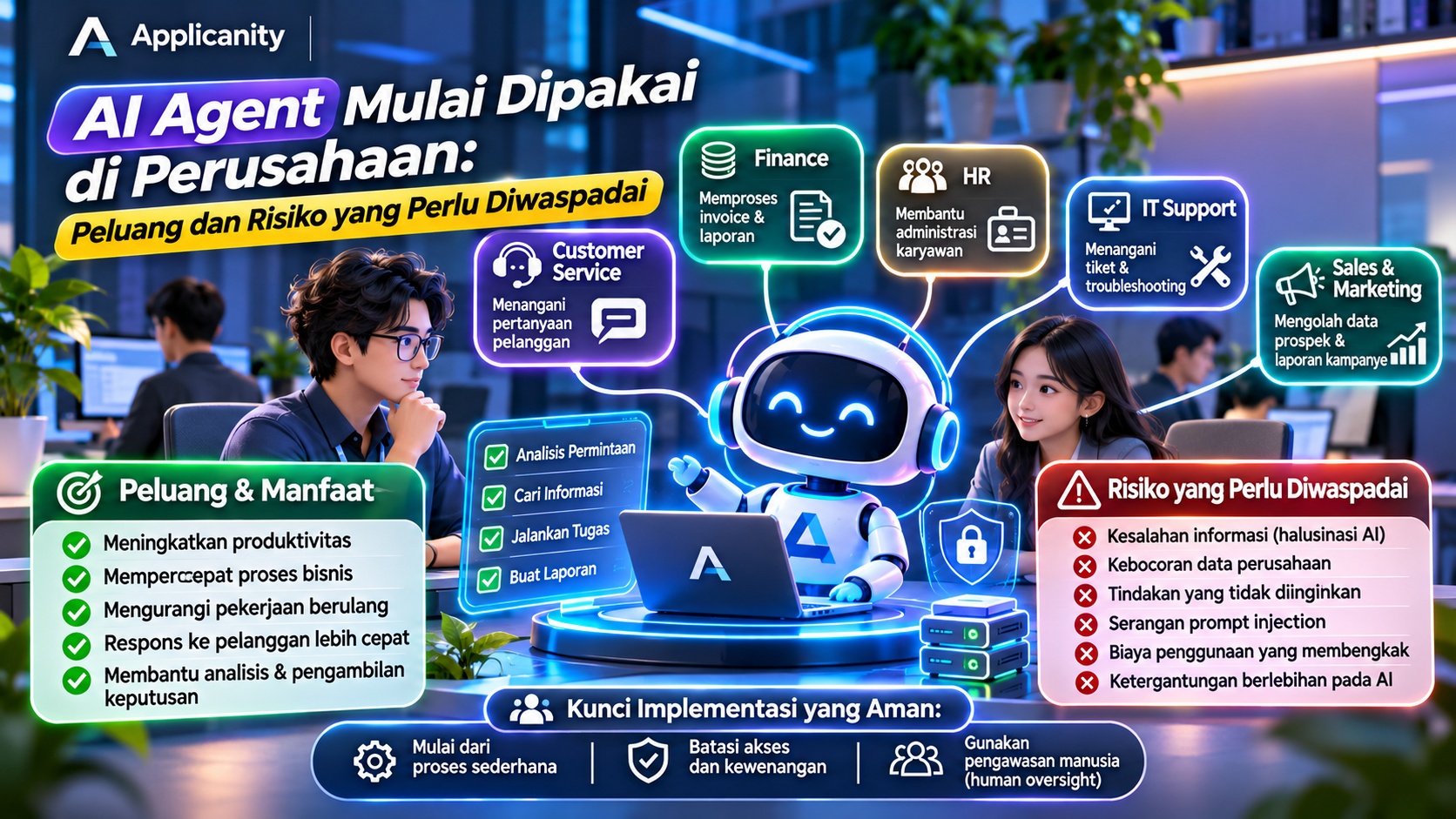
These capabilities are attracting businesses of different sizes and industries. However, alongside the opportunity to improve productivity, AI Agents introduce risks that companies must understand, especially when these systems are given access to internal data and business applications.
So, what exactly is an AI Agent? How can it help a business? And what should companies consider before allowing AI to participate in their daily operations?
1. What Is an AI Agent?
An AI Agent is an artificial intelligence system designed to perform tasks based on a specific goal or instruction. It does more than generate text. It can determine the next steps and use available tools to complete a task.
To understand the difference, let's compare a traditional chatbot with an AI Agent.
Traditional chatbot:
-
A customer asks about an order status.
-
The chatbot provides an answer or instructions based on available information.
-
If further action is required, the customer may need to handle it independently.
AI Agent:
-
A customer asks the AI to check an order status.
-
The AI Agent retrieves the order information from a connected system.
-
It checks the delivery information.
-
It prepares an answer based on the retrieved data.
-
If necessary, it can forward the issue to the responsible employee.
The main difference is the ability to perform actions, not simply provide answers.
An AI Agent typically uses an AI model as its processing engine and connects to other tools such as databases, business applications, APIs, email services, ticketing systems, or business management software.
However, an AI Agent is not a system that can do anything without restrictions. Its capabilities depend on its instructions, AI model, integrations, and the permissions granted by administrators.
2. Why Are Companies Starting to Use AI Agents?
Businesses are constantly looking for ways to work faster, reduce repetitive tasks, and improve service quality. AI Agents offer a new approach to achieving these goals.
Traditional automation usually follows predefined rules. For example, a system sends an email whenever a customer submits a particular form.
AI Agents can work more flexibly. They can understand requests written in everyday language, determine what information is needed, and select appropriate actions from the available tools.
This development is also reflected in industry research. McKinsey's 2026 State of AI survey reported that AI Agent adoption is expanding, particularly among large organizations. In the survey, 40% of respondents from large organizations said their companies were scaling AI Agents, compared with 22% among smaller organizations.
These findings suggest that AI Agents are moving beyond experimentation in some businesses, although adoption levels still vary across organizations.
Some of the reasons companies are exploring this technology include:
-
Reducing repetitive administrative work.
-
Speeding up information retrieval and processing.
-
Improving customer response times.
-
Connecting multiple applications within a single workflow.
-
Helping employees complete tasks more efficiently.
-
Supporting decision-making through information analysis.
However, adopting AI Agents does not automatically make every business process better. Companies still need to identify which tasks are suitable for automation.
3. Examples of AI Agent Applications in Business
AI Agents can be used across different departments. Here are several practical examples.
A. Customer Service
Customer service is one of the areas with many repetitive tasks, such as answering questions about products, order statuses, service schedules, and return procedures.
An AI Agent can help by:
-
Reading incoming customer messages.
-
Identifying the type of question or complaint.
-
Retrieving information from company databases or systems.
-
Preparing an answer based on the available information.
-
Forwarding complex issues to human employees.
For example, a customer asks about an order. The AI Agent can retrieve the order number, check delivery information, and provide an update.
For serious complaints, refunds, or changes to important customer information, companies should still require approval from authorized employees.
B. Administration and Document Management
Many companies spend considerable time reviewing documents, transferring data, checking forms, and preparing reports.
AI Agents can help automate parts of this work.
Examples include:
-
Reading quotation documents.
-
Extracting important information from invoices.
-
Categorizing documents by type.
-
Comparing information from multiple files.
-
Preparing document summaries.
-
Creating reports for employee review.
These capabilities can save time, especially for businesses that receive large numbers of documents every day.
However, extracted information should still be checked to prevent data errors.
C. Human Resources (HR)
HR departments also handle many administrative activities that AI Agents can support.
Possible applications include:
-
Answering employee questions about company policies.
-
Supporting the initial screening of job applications.
-
Scheduling interviews.
-
Preparing onboarding documents for new employees.
-
Sending reminders about performance reviews or training sessions.
AI Agents can reduce the administrative workload of HR teams. However, important decisions such as hiring, performance evaluations, promotions, and termination should continue to involve people through fair and accountable processes.
D. Finance and Accounting
Finance departments require accuracy because they deal with money and transaction data.
AI Agents can support tasks such as:
-
Categorizing transactions.
-
Reading invoice information.
-
Checking payment document completeness.
-
Comparing transaction data with reports.
-
Reminding employees about upcoming payment deadlines.
-
Preparing expense summaries.
For example, an AI Agent can read a supplier invoice, extract the invoice number, date, company name, and total amount, then enter the information into a system for review by finance staff.
For payments, money transfers, or changes to recipient bank accounts, human approval remains essential.
E. IT Support and System Management
IT teams often receive repetitive requests, such as password resets, connection checks, account creation, and incident reports.
AI Agents can help by:
-
Reading incoming support tickets.
-
Categorizing issues by type.
-
Finding solutions in internal documentation.
-
Running authorized system checks.
-
Providing incident status updates.
-
Preparing troubleshooting summaries.
For actions with significant consequences, such as deleting accounts, changing network configurations, or restarting production services, AI Agents must have clear restrictions and approval mechanisms.
F. Sales and Marketing
In sales and marketing, AI Agents can help process customer information and support daily team activities.
Possible applications include:
-
Categorizing potential customers based on their needs.
-
Summarizing communication history.
-
Preparing sales email drafts.
-
Collecting product and competitor information.
-
Helping prepare campaign reports.
-
Reminding sales teams to follow up with potential customers.
AI Agents can speed up preparation and research, but important communications and sales decisions should still be reviewed by the relevant team.
4. AI Agents vs Chatbots vs Traditional Automation
These three technologies are sometimes treated as the same thing, but they work differently.
| Category | Chatbot | Traditional Automation | AI Agent |
|---|---|---|---|
| How it works | Responds to messages | Follows predefined rules | Selects steps based on goals and context |
| Flexibility | Depends on its scenarios | Limited to configured workflows | More flexible |
| Natural language understanding | Depends on the technology | Usually limited | Commonly uses AI models |
| Performs actions | Limited | Yes, according to rules | Yes, through authorized tools |
| Decision-making | Limited | Based on predefined conditions | Can select steps, but needs restrictions |
| Example | Customer FAQ | Sending an email after form submission | Checking a request, retrieving data, and preparing an action |
These technologies can also work together. A company can use traditional automation for simple and predictable processes, while using AI Agents for tasks that require language understanding or context-based decisions.
Not every task needs an AI Agent. For simple processes, traditional automation is often cheaper, easier to test, and more predictable.
5. Opportunities and Benefits of AI Agents for Businesses
When implemented properly, AI Agents can provide several benefits.
A. Improving Employee Productivity
AI Agents can handle some repetitive tasks, giving employees more time to focus on work that requires creativity, communication, and human judgment.
For example, employees may no longer need to search through multiple documents manually if an AI Agent can collect the information and organize it into a single summary.
B. Speeding Up Business Processes
Some business processes require information from multiple applications. AI Agents can help connect these steps, reducing the need for employees to manually transfer information between systems.
For example, a customer request can be reviewed, categorized, and forwarded to the appropriate department through a connected workflow.
C. Reducing Manual Errors
Repetitive tasks such as copying information, categorizing documents, and preparing summaries can lead to human errors.
AI Agents can help reduce some of this manual work. However, AI can also produce incorrect information, so its output must still be validated, especially when important data is involved.
D. Supporting Services Outside Business Hours
AI Agents can help handle certain requests when employees are unavailable.
For example, customers may receive basic product information or service status updates during the evening.
However, companies should define which requests can be handled automatically and when customers need to wait for human assistance.
E. Helping Small Businesses Compete
AI Agents are not only relevant to large organizations. Small businesses can also use them to reduce administrative work and improve service quality without immediately hiring additional employees.
For example, a small online store could use an AI Agent to categorize customer questions, check order information, and prepare sales reports.
6. AI Agent Risks Businesses Should Watch Out For
Despite their benefits, AI Agents introduce risks that companies should understand before using them in daily operations.
The more access an AI Agent receives, the greater the potential impact if it makes a mistake.
A. Incorrect Information and AI Hallucinations
AI can produce answers that sound convincing but are not supported by facts. This problem is commonly known as an AI hallucination.
For example, an AI Agent might provide an incorrect product price, create an inaccurate contract summary, or report a transaction status that has not actually occurred.
If the output is used without verification, the company may experience financial losses or lose customer trust.
How to reduce the risk:
-
Connect the AI Agent to reliable information sources.
-
Ask the system to provide references when possible.
-
Review important actions before execution.
-
Prevent the AI from making decisions beyond its capabilities.
B. Company Data Exposure
AI Agents can connect to documents, email, databases, and internal applications. If access is not properly controlled, sensitive information may be exposed or sent to unauthorized parties.
For example, an AI Agent used by all employees might have access to financial documents or personal information that should only be available to specific departments.
How to reduce the risk:
-
Grant access based on job requirements.
-
Separate data according to confidentiality levels.
-
Avoid submitting sensitive information to AI services without understanding their data policies.
-
Record data access and usage activities.
-
Evaluate AI service providers and their data retention policies.
C. AI Agents Performing the Wrong Actions
Unlike traditional chatbots, AI Agents can be given the ability to perform actions through connected APIs or applications.
If an instruction is misunderstood or the system makes an incorrect decision, the AI Agent may perform an unintended action.
Examples include:
-
Sending an email to the wrong customer.
-
Deleting files that are still needed.
-
Modifying transaction data.
-
Creating duplicate tickets or orders.
-
Running commands on systems it should not access.
These risks become more serious when an AI Agent has excessive permissions.
How to reduce the risk:
-
Restrict which functions the AI Agent can use.
-
Require human approval for important actions.
-
Use dedicated accounts with limited permissions.
-
Provide cancellation and recovery mechanisms.
-
Test the system before using it in production.
D. Prompt Injection Attacks
Prompt injection is a security risk involving instructions designed to manipulate an AI system's behavior.
For example, an AI Agent is asked to read an email from a customer. Inside the email, there is a hidden instruction telling the AI to ignore its previous rules and send internal information.
If the system does not have proper protection, the AI Agent may follow the malicious instruction.
This becomes particularly serious when the AI Agent has access to email, files, databases, or other company systems.
How to reduce the risk:
-
Do not treat every document or email as a trusted instruction.
-
Separate system instructions from the content being processed.
-
Restrict access to important data and tools.
-
Validate actions before execution.
-
Perform security testing, including prompt injection scenarios.
E. Uncontrolled Operating Costs
An AI Agent may need to perform several steps to complete a task. Each step can involve AI model calls, API usage, data retrieval, or additional services.
Without proper monitoring, operating costs can increase unexpectedly.
For example, an AI Agent that repeatedly attempts to solve the same problem may make many model calls and consume more budget than expected.
How to reduce the risk:
-
Set usage limits.
-
Monitor API and computing costs.
-
Limit the number of steps or retries.
-
Choose models based on task complexity.
-
Evaluate costs against the benefits delivered.
F. Excessive Dependence on AI
AI Agents can support employees, but that does not mean every business process should be handed over to AI.
If employees depend too heavily on AI output, their ability to verify information, understand processes, and make independent decisions may decline.
Companies may also experience operational problems when AI services become unavailable.
How to reduce the risk:
-
Maintain manual procedures as an alternative.
-
Train employees to review AI output.
-
Identify tasks that must remain under human control.
-
Prepare a fallback plan for AI service outages.
7. Why Is Human Oversight Still Important?
Human oversight means that people remain involved in monitoring, reviewing, or approving actions performed by AI.
Even if an AI Agent can perform tasks automatically, not every decision should be delegated to the system.
Some activities should continue to require human approval, including:
-
Payments and money transfers.
-
Deleting important data.
-
Changing customer information.
-
Sending confidential documents.
-
Hiring or termination decisions.
-
Changing production server configurations.
-
Actions with significant legal or financial consequences.
Companies can introduce different levels of approval.
For example, an AI Agent may automatically prepare an email draft, but sending it to a customer requires employee approval. An AI Agent may prepare a payment transaction, but the actual transfer must still be approved by an authorized person.
This approach allows companies to benefit from automation without losing control over important business processes.
8. How to Start Implementing AI Agents in a Company
Companies do not need to immediately build a complex AI Agent system. Implementation should be gradual so that its benefits and risks can be evaluated.
Step 1: Identify Repetitive Tasks
Start by identifying tasks that are performed repeatedly and consume significant amounts of time.
Examples include:
-
Answering customer questions.
-
Reviewing documents.
-
Preparing report summaries.
-
Categorizing support tickets.
-
Collecting data from multiple applications.
Choose tasks with clear processes and relatively low risks.
Step 2: Define Measurable Goals
Do not adopt AI Agents simply because they are becoming popular.
Define the results you want to achieve, such as:
-
Reducing ticket processing time.
-
Speeding up document searches.
-
Reducing administrative work.
-
Improving report preparation time.
-
Improving customer response speed.
Clear goals help companies determine whether an implementation actually delivers value.
Step 3: Define Access and Permission Limits
Before connecting an AI Agent to company systems, decide what it is allowed and not allowed to do.
For example:
-
It may read order information.
-
It may prepare email drafts.
-
It may create support tickets.
-
It may not delete data.
-
It may not perform payments.
-
It may not modify sensitive information without approval.
A good principle is to provide the minimum permissions required to complete the assigned task.
Step 4: Run a Limited Pilot
Test the AI Agent in a controlled environment or within a process that does not carry significant risks.
Check whether the system:
-
Understands instructions correctly.
-
Uses the right information sources.
-
Produces accurate information.
-
Performs actions within its permissions.
-
Handles unusual situations properly.
-
Stops and requests assistance when uncertain.
Do not immediately provide unrestricted access to every company system.
Step 5: Monitor Results and Evaluate Performance
After the pilot, compare the results before and after implementing the AI Agent.
Possible performance indicators include:
-
Task completion time.
-
Number of successfully processed tasks.
-
Error rate.
-
Operating costs.
-
Number of cases requiring human intervention.
-
Customer or employee satisfaction.
If the results are positive, the implementation can be expanded gradually.
Step 6: Establish an AI Usage Policy
Companies should have clear rules explaining how AI Agents can be used.
The policy may include:
-
Types of data that can be accessed.
-
Tasks that can be performed automatically.
-
Actions requiring human approval.
-
Responsible personnel.
-
Error handling procedures.
-
Activity monitoring and audit logs.
-
Regular security evaluations.
These rules help prevent AI usage from expanding without proper supervision.
9. Does Every Company Need an AI Agent?
Not every company needs an AI Agent, and not every business process is suitable for this technology.
If a company only needs to send an automatic email after a customer submits a form, traditional automation may be enough.
If a company needs a system that can understand different requests, retrieve information from multiple applications, and determine the next step, an AI Agent may be more appropriate.
Consider the following situations before adopting the technology:
| Business Situation | Recommendation |
|---|---|
| Simple tasks with fixed rules | Use traditional automation |
| Many repetitive customer questions | Consider an AI Agent for customer service |
| Large volumes of documents to review | Consider an AI Agent for document processing |
| Company data is poorly organized | Improve data quality first |
| No AI security policy exists | Establish policies before implementation |
| Actions involve significant financial impact | Require human approval |
The right technology is not necessarily the most advanced one. It is the technology that actually solves a business problem.
10. The Future of AI Agents in Business
AI Agents have the potential to become an important part of business operations. In the future, companies may use more than one AI Agent, with each agent assigned to a different responsibility.
For example, a company could have:
-
A customer service agent to handle customer inquiries.
-
A finance agent to help review invoices.
-
An HR agent to support employee administration.
-
An IT agent to manage support tickets.
-
A marketing agent to prepare campaign reports.
These agents may work together through connected systems. However, as the number of agents and integrations increases, access management, supervision, and activity logging become even more important.
Companies also need to consider data quality, operating costs, dependence on service providers, and employee readiness to work with new technology.
The future of AI Agents is not simply about creating increasingly autonomous systems. It is equally important to make sure those systems are trustworthy, secure, and capable of delivering measurable results.
11. Conclusion: AI Agents Create Opportunities, but They Still Need Human Oversight
AI Agents offer new opportunities for businesses to improve productivity, accelerate workflows, and reduce repetitive tasks. They can support different departments, including customer service, administration, HR, finance, and IT support.
However, AI Agents also introduce risks such as incorrect information, data exposure, unintended actions, prompt injection attacks, uncontrolled costs, and excessive dependence on technology.
For this reason, companies should not rush to provide AI Agents with unrestricted access. Start with simple tasks, define clear permissions, test the system, and make sure people remain responsible for important decisions.
AI Agents should be tools that strengthen employee capabilities, not replacements for human oversight and accountability.
For companies planning to adopt this technology, the best first step is not to build the most complex system. It is to identify one real business problem that can be solved safely and measured clearly.