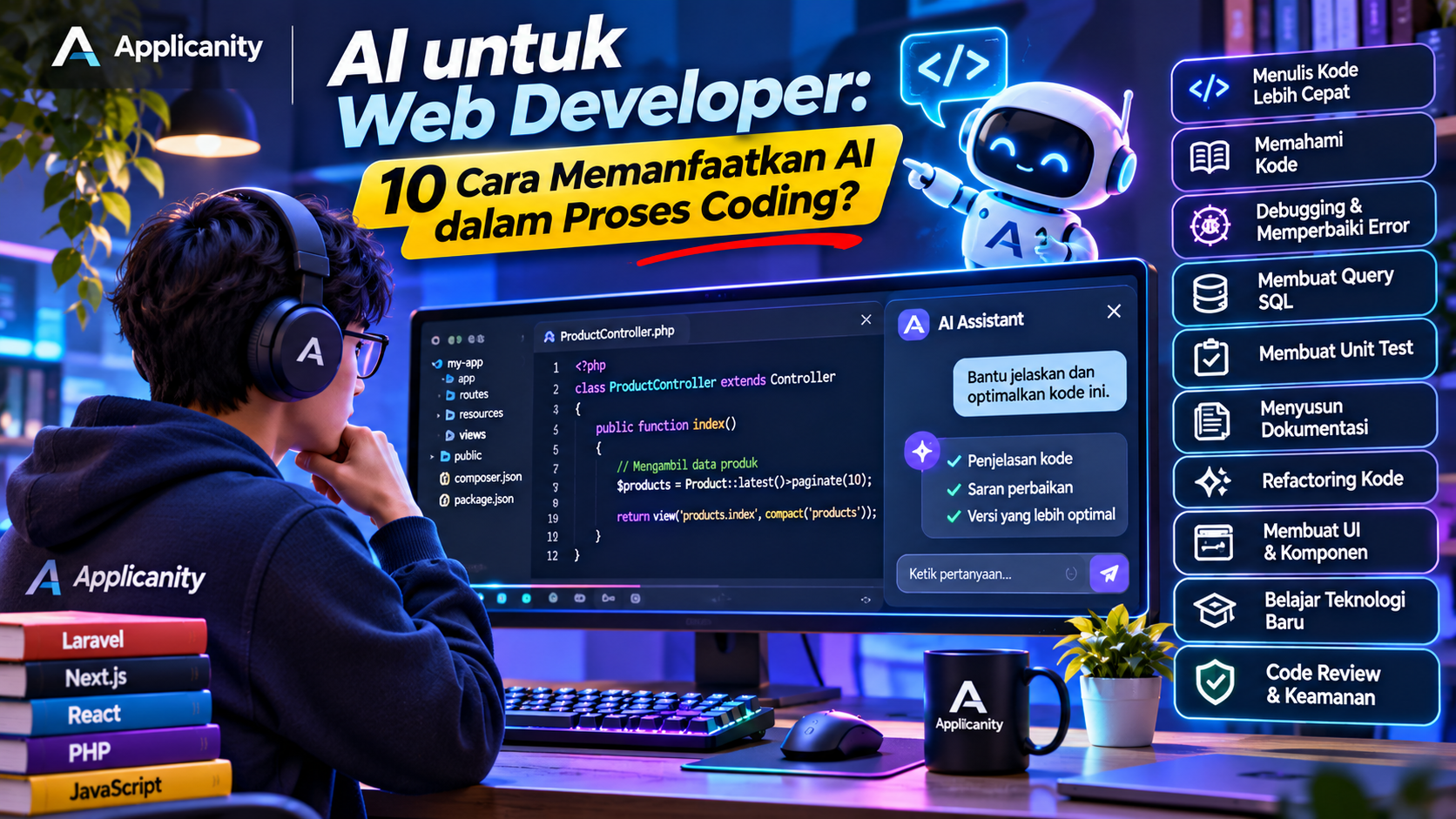
AI for Web Developers: 10 Ways to Use AI in Your Coding Workflow
The development of Artificial Intelligence (AI) is changing how people work, including the way websites and applications are built. In the past, web developers had to write almost every line of code manually. Today, many development tasks can be supported by AI.
From generating HTML structures and writing JavaScript functions to fixing PHP errors, creating SQL queries, and understanding unfamiliar code, AI can assist developers through simple instructions and questions.
Tools such as ChatGPT, GitHub Copilot, Claude, and other AI coding assistants are becoming increasingly common in software development workflows.
But how useful is AI for web developers? Can it replace programming skills? And how can developers use it to make coding more efficient?
In this article, we will explore 10 practical ways to use AI in the coding process, especially for web developers.
What Is the Role of AI in Web Development?
Before exploring the practical applications, it is important to understand that AI is more than just a tool for automatically generating code.
AI can support developers throughout different stages of software development, including planning, coding, debugging, testing, and documentation.
For example, a developer building a login feature may need to complete several tasks:
-
Design the database structure.
-
Create the login form using HTML and CSS.
-
Add validation using JavaScript.
-
Implement backend authentication.
-
Connect the application to a database.
-
Handle login errors and security requirements.
With AI assistance, developers can request implementation examples, get explanations, and explore alternative solutions for each stage.
However, AI-generated results must always be reviewed. AI can produce code that looks correct but contains bugs, security problems, or implementation details that do not match the application's requirements.
The best way to use AI is as a development assistant, not as a replacement for developers.
10 Ways to Use AI in the Coding Process
Here are ten practical ways web developers can use AI to improve their productivity.
1. Write Code Faster
One of the most popular uses of AI is helping developers write code.
Developers can describe what they need using everyday language, and AI can generate code examples based on those instructions.
For example, suppose we want to create a button using HTML and CSS with a simple hover effect.
We can provide the following instruction:
Create a button using HTML and CSS with a blue background, rounded corners, and a hover effect when the mouse moves over it.
AI can generate HTML and CSS that can be studied, tested, or customized.
A simple example:
<button class="btn-primary">Save Data</button>
.btn-primary {
    background-color: #2563eb;
    color: white;
    padding: 10px 20px;
    border: none;
    border-radius: 8px;
    cursor: pointer;
    transition: background-color 0.3s;
}

.btn-primary:hover {
    background-color: #1d4ed8;
}
Although this example is simple, AI can also help generate more complex components, including navigation bars, cards, modals, tables, and forms with validation.
When should you use it?
-
When creating new UI components.
-
When you need implementation examples.
-
When you want to speed up repetitive coding tasks.
-
When experimenting with a new library or framework.
2. Understand Unfamiliar Code
Developers do not always understand every part of a project.
When working with an existing application, you may encounter functions, classes, or program structures created by previous developers.
Instead of reading every line without understanding its purpose, you can ask AI to explain the code.
For example, consider this PHP code:
class Student {
    private $name;

    public function __construct($name) {
        $this->name = $name;
    }

    public function getName() {
        return $this->name;
    }
}
You can ask AI:
Explain this PHP code step by step. What are the purposes of the constructor, private property, and public method?
AI can explain the relationship between classes, properties, constructors, and methods in simpler language.
This is especially useful when:
-
Learning an existing project.
-
Reading code written by other developers.
-
Learning a new framework.
-
Understanding programming concepts.
-
Getting familiar with a new codebase.
AI can also help explain program flows involving multiple files, provided you give it enough code and context.
3. Debug Code and Find the Cause of Errors
Debugging is one of the activities that can consume a significant amount of a developer's time.
Sometimes, an error message does not immediately reveal the actual problem. Developers need to read the error, inspect the code, identify possible causes, and test different solutions.
AI can help make this process faster.
For example, you may encounter this JavaScript error:
Uncaught TypeError: Cannot read properties of undefined
You can provide the error message and the related code to AI.
Then ask it to:
-
Explain what the error means.
-
Identify possible causes.
-
Find the problematic part of the code.
-
Suggest alternative solutions.
-
Explain the risks of each solution.
One important thing to remember is not to submit an error message without context. Include the related code, the expected result, and what actually happened.
The more relevant information you provide, the more likely AI will produce a useful answer.
4. Create SQL Queries and Design Databases
Web developers frequently work with databases. Their tasks include creating tables, retrieving data, filtering records, and generating reports.
AI can help write SQL queries based on requirements described in everyday language.
For example, suppose we have a students table and want to retrieve all students who live in Jakarta.
We can ask:
Write an SQL query to retrieve all student records from the students table where the city column is Jakarta.
A possible result:
SELECT *
FROM students
WHERE city = 'Jakarta';
AI can also help create more complex queries, including:
-
JOIN operations.
-
GROUP BY and aggregate functions.
-
Subqueries.
-
Pagination.
-
Date-based filtering.
-
Sales reports.
-
Database structures based on application requirements.
Besides writing queries, AI can explain table relationships and suggest database structures.
However, every query still needs to be reviewed. AI-generated queries are not always efficient, especially when working with tables containing millions of records.
For production applications, pay attention to indexing, query security, and database performance.
5. Create Unit Tests and Test Your Code
Writing code is not the only responsibility of a developer. We also need to make sure the code works as expected.
This is where AI can help generate unit tests.
For example, suppose we have a JavaScript function that calculates the total price:
function calculateTotal(price, quantity) {
    return price * quantity;
}
We can ask AI:
Create unit tests for the calculateTotal function using several scenarios, including normal values, zero quantity, and invalid input.
AI can generate different test scenarios to help verify the function's behavior.
Testing scenarios may include:
-
Normal input.
-
Empty input.
-
Zero values.
-
Negative values.
-
Incorrect data types.
-
Boundary conditions and edge cases.
AI can also help generate tests using frameworks such as PHPUnit, Jest, Vitest, and other testing tools.
However, developers must ensure that the test scenarios match the application's business rules. Passing tests does not automatically prove that every application requirement has been fulfilled.
6. Generate Code Documentation
Documentation is often overlooked during software development.
Developers usually focus on completing features rather than explaining how their code works.
However, documentation is important, especially when a project involves multiple developers or needs to be maintained over a long period.
AI can help generate documentation based on existing code.
For example, we can provide a function and ask AI to generate documentation comments using the PHPDoc format.
/**
 * Calculates the total price based on unit price and quantity.
 *
 * @param float $price Product unit price.
 * @param int $quantity Number of products.
 * @return float Total price.
 */
function calculateTotal($price, $quantity) {
    return $price * $quantity;
}
Besides code comments, AI can help create:
-
README.md files.
-
API documentation.
-
Project installation guides.
-
Environment configuration instructions.
-
Database structure documentation.
-
Feature usage guides.
-
Changelogs based on code changes.
With better documentation, other developers can understand a project without having to study the entire codebase from the beginning.
7. Refactor Code and Improve Code Quality
Refactoring is the process of improving code structure without changing the program's main functionality.
The goal is to make code easier to read, maintain, and extend.
For example, you may find a function that is too long and contains many if conditions. You can ask AI to help split it into smaller and more organized functions.
AI can also provide suggestions about:
-
Using clearer variable names.
-
Separating function responsibilities.
-
Removing duplicated code.
-
Applying object-oriented programming principles.
-
Using design patterns.
-
Reducing code complexity.
However, AI-generated refactoring should never be applied without review.
Make sure the program behaves the same way after the changes. Use unit tests or integration tests to help verify that refactoring has not broken existing features.
8. Build Website Layouts and UI Components
Besides backend development, AI can also assist with frontend work.
Developers can ask AI to create interface components based on descriptions, user requirements, or design references.
For example:
Create an admin dashboard using React and Tailwind CSS. Include a sidebar, navbar, sales statistics, a recent transactions table, and a revenue chart.
AI can generate React component structures, Tailwind classes, and sample data to populate the interface.
Some components that AI can help create include:
-
Navigation bars and sidebars.
-
Admin dashboards.
-
Input forms.
-
Confirmation modals.
-
Data tables.
-
Pagination.
-
Product cards.
-
Login and registration pages.
-
Responsive layouts for mobile devices.
AI can also help turn simple design references into HTML and CSS or implement components using frameworks such as React, Vue, and Next.js.
However, the generated interface still needs to be reviewed for responsiveness, accessibility, design consistency, and user experience.
9. Learn New Frameworks and Technologies
Web development continues to evolve. New frameworks, libraries, and tools are introduced regularly.
A developer may be comfortable with PHP and Laravel but later need to work on a Next.js project. Another developer who usually writes JavaScript may want to start learning TypeScript.
AI can act as a learning companion that explains concepts and provides examples.
For example, you can ask:
I am familiar with PHP Laravel. Explain routing in Next.js by comparing it with Laravel routing.
By providing information about your existing knowledge, AI can explain new concepts through comparisons that are easier to understand.
AI can also help with:
-
Creating learning roadmaps.
-
Explaining framework concepts.
-
Comparing different technologies.
-
Providing small project examples.
-
Understanding technical documentation.
-
Troubleshooting errors while following tutorials.
However, do not rely entirely on AI responses. Continue learning from official documentation because framework and library information can change between versions.
10. Perform Code Reviews and Security Checks
Before merging code into the main branch or deploying it to a production server, developers should perform a code review.
Code reviews help ensure that code is readable, works correctly, and does not introduce new problems.
AI can help perform an initial review of newly written code.
You can ask AI to check for:
-
Potential bugs.
-
Inefficient code.
-
Duplicated code.
-
Input validation issues.
-
SQL Injection risks.
-
Cross-Site Scripting (XSS) vulnerabilities.
-
Authentication and authorization problems.
-
Error-handling issues.
For example, you can provide an API endpoint and ask AI to check whether user input is properly validated.
AI may identify a SQL query that directly combines user input with a query string. This can indicate a potential SQL Injection vulnerability.
However, AI is not a replacement for a security audit. Security reviews should still involve proper development practices, developer code reviews, automated security scanners, and appropriate testing.
An Example of an AI-Assisted Coding Workflow
To make things easier to understand, let's look at how AI can support the development of a simple feature.
Suppose we want to build a product management feature for a Laravel application.
| Stage | Developer's Task | How AI Helps |
|---|---|---|
| 1. Planning | Define feature requirements | Help organize requirements |
| 2. Database | Design table structures | Generate migration and relationship drafts |
| 3. Backend | Build models and controllers | Provide code examples |
| 4. Frontend | Create product forms and tables | Help generate UI components |
| 5. Validation | Define input rules | Suggest validation rules |
| 6. Testing | Test different scenarios | Generate test case drafts |
| 7. Debugging | Fix errors | Analyze possible causes |
| 8. Documentation | Write feature guides | Generate documentation drafts |
| 9. Review | Inspect implementation | Provide initial feedback |
As the example shows, AI can support almost every stage of development. However, technical decisions and final verification remain the developer's responsibility.
AI Tools Web Developers Can Use
There are many AI tools available to support coding activities. Here are some examples.
1. ChatGPT
Can help generate code examples, explain programming concepts, analyze errors, create SQL queries, and assist with feature planning.
2. GitHub Copilot
https://github.com/features/copilot
Provides code suggestions directly inside the editor. It is useful for developers who want code completion and coding assistance while working.
3. Claude
Can help developers understand code, analyze projects, refactor implementations, and explore solutions to programming problems.
4. Cursor
An AI-powered code editor that helps developers understand and modify code within a project.
5. Windsurf
An AI-assisted development editor that can help understand project context and support the coding process.
Each tool has different capabilities, limitations, and usage models. Developers can choose based on their needs, workflow, and budget.
Tips for Using AI Without Becoming Fully Dependent on It
Although AI can help speed up development, developers still need a solid understanding of programming.
Here are some tips for using AI effectively.
1. Understand the Generated Code
Do not immediately copy AI-generated code into your project. Study how each part works so you understand what the code actually does.
2. Give Clear Instructions
Avoid overly general instructions. Explain the programming language, framework, version, feature requirements, and implementation constraints.
3. Test Everything
Always run and test the generated code. Code that looks correct does not necessarily behave as expected.
4. Review Security
Never assume AI-generated code is secure. Check input validation, authentication, authorization, sensitive data handling, and application configuration.
5. Use Official Documentation
When AI provides information about a framework or library, compare it with official documentation, especially for features that change between versions.
6. Never Share Sensitive Information
Avoid submitting passwords, API keys, tokens, private keys, customer information, or confidential company data to AI services that have not been approved to handle such information.
Always review the privacy policies and data usage settings of the tools you use.
Will AI Replace Web Developers?
This question is becoming more common as AI continues to improve its ability to generate code.
AI can automate some tasks that developers previously performed manually. However, software development is about much more than writing code.
Developers must understand user requirements, design application architecture, make technical decisions, manage security, integrate systems, and ensure that applications work properly.
AI can generate a function, but it may not understand the entire business requirement behind that function.
It may also fail to recognize how a code change affects an existing system unless sufficient context is provided and the results are carefully reviewed.
For this reason, important skills for future web developers will include more than writing code. Developers will need to understand problems, design solutions, evaluate AI-generated results, and make appropriate technical decisions.
Developers who know how to use AI effectively may become more productive than those who ignore these technological developments.
Conclusion
AI has become a useful assistant in web development. From writing code and understanding programs to debugging, creating SQL queries, writing unit tests, and performing code reviews, AI can help accelerate many development activities.
However, AI is not a solution to every programming problem. Generated code must still be understood, reviewed, tested, and adapted to the application's requirements.
Use AI as an assistant to improve productivity, not as a replacement for critical thinking and technical knowledge.
Ultimately, a good web developer is not simply someone who can produce a large amount of code. A good developer is someone who can build secure, efficient, maintainable solutions that genuinely solve users' problems.