WordPress vs custom website, website bisnis, jasa pembuatan website, custom web development, WordPress
In today's digital world, a website is no longer just an additional part of a company's identity. It has become an important part of business operations, helping companies introduce their products, build customer trust, receive orders, and support their daily activities.
However, before building a website, one common question often comes up: should you use WordPress or build a custom website?
Both are widely used approaches in website development. WordPress is known as a platform that allows people to create and manage websites without writing all the code from scratch. Meanwhile, a custom website provides the freedom to build a system based on specific business requirements through software development.
Both approaches have their own advantages and disadvantages. WordPress is not automatically the best choice simply because it is convenient. Likewise, a custom website is not always better just because it is built using custom code.
So, which option is more suitable for your business?
Let's explore the differences between WordPress and custom websites to help you make a more informed decision.
1. What Is WordPress?
WordPress is a Content Management System (CMS), a platform that allows users to create, manage, and update website content through an administrative dashboard.
With WordPress, users do not need extensive programming knowledge to create a website. Most content management tasks can be handled through its built-in administration interface.
For example, a business owner can create a company profile page, publish blog articles, upload product images, and update contact information without asking a developer to modify the source code every time content changes.
WordPress also has a large ecosystem of themes, plugins, and supporting services.
Some features that can be added through plugins include:
-
Contact forms and quotation requests.
-
Online stores using WooCommerce.
-
SEO optimization.
-
Payment integrations.
-
Security and backup systems.
-
Membership functionality.
-
Multilingual website support.
Because of its ease of use and extensive ecosystem, WordPress is widely used for different types of websites, including personal blogs, company profiles, news websites, portfolios, and online stores.
2. What Is a Custom Website?
A custom website is a website developed specifically around the needs and goals of a business.
Unlike WordPress, which provides a ready-to-use CMS, a custom website is built through a development process using programming languages, frameworks, databases, and technologies selected according to project requirements.
Developers can define how the website looks, how its features work, how information is stored, how users interact with the system, and how it connects to other services.
For example, a company may need a system with features such as:
-
A dedicated employee dashboard.
-
Customer and transaction management.
-
Document approval workflows.
-
Integration with internal applications.
-
Automated business reports.
-
User permissions based on job roles.
Some of these requirements may be implemented in WordPress using plugins and additional customization. However, when business processes become more complex, custom development can provide greater flexibility and control.
Some technologies commonly used to build custom websites include:
-
PHP with Laravel or Yii.
-
JavaScript with Node.js.
-
React.js and Next.js.
-
Python with Django or FastAPI.
-
Databases such as MySQL and PostgreSQL.
The technology does not always need to follow the latest trends. It should be selected based on project requirements, the development team's capabilities, maintenance costs, and long-term plans.
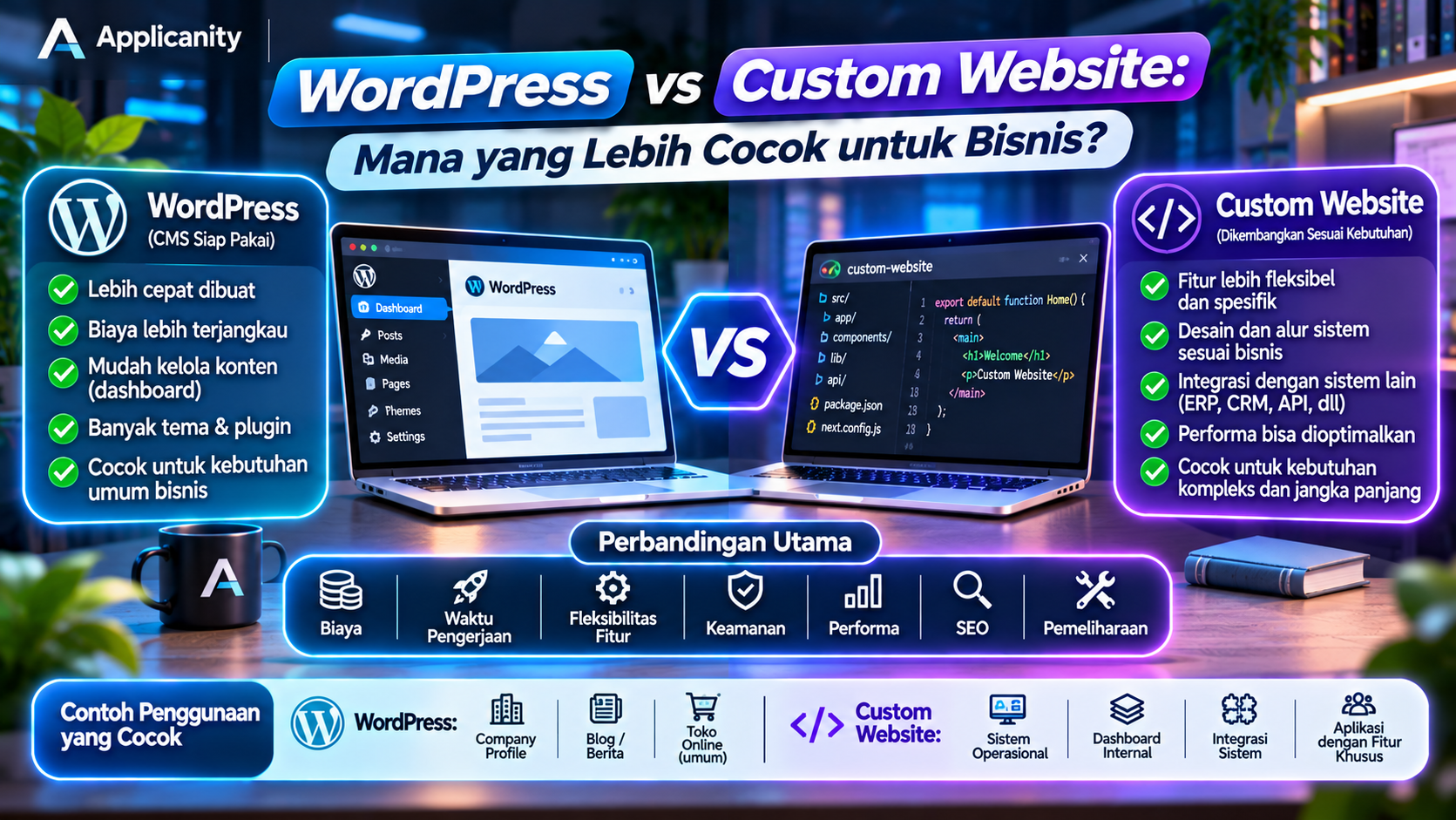
3. WordPress vs Custom Website: Key Differences
Although both approaches can be used to build business websites, there are several important differences to understand.
| Aspect | WordPress | Custom Website |
|---|---|---|
| Development process | Uses an existing CMS | Built around project requirements |
| Initial cost | Generally more affordable | Can be higher due to development work |
| Development time | Usually faster | Depends on feature complexity |
| Design | Uses themes or custom designs | Can be fully tailored |
| Features | Uses plugins and additional development | Built according to system requirements |
| Flexibility | Depends on the WordPress ecosystem and customization | Greater freedom in architecture and implementation |
| Content management | Built-in CMS dashboard | Requires a custom or integrated CMS |
| Maintenance | WordPress, theme, plugin, and server updates | Depends on technology and architecture |
| Security | Requires maintenance of core, themes, plugins, and configuration | Depends on code quality and security implementation |
| Scalability | Can grow with proper optimization | Can be designed around expected growth |
These are general comparisons. WordPress can be extended into a complex platform, while a custom website can also be very simple. The final result depends on planning and implementation quality.
4. Cost Comparison: Which Option Is More Affordable?
Cost is one of the main considerations when a business wants to build a website.
In general, WordPress is often a more affordable option for simple projects because many components are already available. Custom websites, on the other hand, require additional analysis, planning, development, and testing.
However, development cost is not the only expense to consider. There are also operating and maintenance costs throughout the website's lifetime.
The Cost of Building a WordPress Website
Common WordPress expenses include:
-
Domain registration.
-
Hosting or VPS.
-
Premium themes, if needed.
-
Paid plugins, if needed.
-
Installation and configuration services.
-
Design and customization services.
-
Website maintenance and updates.
For a simple company profile website, WordPress can be an efficient solution because many basic features are already available.
However, if the website requires multiple premium plugins, custom integrations, and complex modifications, the total cost can increase.
The Cost of Building a Custom Website
A custom website generally requires a larger initial budget because its development process is more extensive.
Its costs may include:
-
Business requirement analysis.
-
UI/UX design.
-
Frontend development.
-
Backend development.
-
Database design.
-
API and third-party integrations.
-
System testing.
-
Server deployment.
-
Ongoing maintenance and development.
Although the initial cost may be higher, a custom website can be a worthwhile investment when it supports important business processes and reduces manual work.
Do Not Focus Only on Initial Development Cost
Imagine a business choosing WordPress because the initial development cost is lower. As the business grows, the website requires more plugins, custom integrations, and increasingly complex modifications.
Meanwhile, another business may invest more in a custom system from the beginning but receive a solution that better matches its operational workflows.
On the other hand, not every business needs a custom website. Building a custom system for requirements that WordPress can already handle may create unnecessary expenses.
For this reason, consider the Total Cost of Ownership (TCO), not just the initial development price.
5. Flexibility and Future Development
Every business has different requirements. Some companies only need a website to display information, while others need a system that supports daily operations.
This is where the flexibility of each approach becomes important.
WordPress Flexibility
WordPress provides a wide range of themes and plugins that allow developers to add features without building everything from scratch.
For example, if a business wants to create an online store, WooCommerce can add product management, shopping carts, orders, and transaction management.
If the website needs a contact form, several plugins are available for that purpose.
These features can make website development faster.
However, using too many plugins or poorly maintained plugins can increase complexity, create compatibility issues, and make maintenance more difficult.
Not every business requirement can also be solved easily through plugins. At some point, custom development may still be necessary.
Custom Website Flexibility
A custom website provides greater freedom in deciding how the system should work.
Developers can build features around business workflows without having to adapt every process to the limitations of a particular plugin or CMS structure.
For example, a distribution company may need an ordering system with the following workflow:
-
A customer creates an order.
-
An administrator checks product availability.
-
A supervisor approves the order.
-
The system generates a shipping document.
-
The finance department verifies payment.
-
The customer can track the order status.
A system like this can be designed around the company's actual workflow, including business rules, user permissions, and required reports.
However, this flexibility also means taking greater responsibility for development and maintenance.
6. Website Performance and Speed
Website speed affects the visitor experience. A slow website may cause visitors to leave before finding the information they need.
Both WordPress and custom websites can deliver good performance, but they require proper management.
WordPress Performance
WordPress performance depends on several factors, including:
-
Hosting or VPS quality.
-
The selected theme.
-
The number and quality of plugins.
-
Image optimization.
-
Caching.
-
Database configuration.
-
PHP version and server configuration.
A WordPress website with a lightweight theme, necessary plugins, caching, and suitable server resources can perform very well.
On the other hand, a website with too many plugins, a heavy theme, and insufficient server resources may experience performance issues.
Custom Website Performance
Custom websites allow developers to optimize individual parts of the system based on application requirements.
For example, developers can optimize database queries, configure caching, use a CDN, and remove unnecessary processing.
However, a custom website is not automatically faster.
Poorly written code, inefficient database queries, or unsuitable infrastructure can still make a custom website slow.
The conclusion: performance depends not only on the platform but also on development quality, server configuration, and ongoing maintenance.
7. Security: WordPress vs Custom Website
Security is an important aspect that should never be ignored, especially when a website stores customer information, transaction records, or internal company data.
WordPress Security
WordPress has an active development team and a large security ecosystem. However, website security also depends on how owners and administrators maintain the website.
Some important practices include:
-
Updating WordPress regularly.
-
Updating themes and plugins.
-
Removing unused plugins.
-
Using strong passwords.
-
Restricting user permissions.
-
Enabling regular backups.
-
Using HTTPS.
-
Monitoring suspicious activities.
One of the risks associated with WordPress is the use of poorly maintained themes or plugins that contain security vulnerabilities or come from untrusted sources.
Custom Website Security
With a custom website, developers have greater control over the code structure and security mechanisms.
However, this does not mean a custom website is automatically more secure.
Developers still need to consider:
-
Input validation and sanitization.
-
Protection against SQL Injection.
-
Cross-Site Scripting (XSS) prevention.
-
Authentication and authorization management.
-
HTTPS encryption.
-
API security.
-
Secret and environment variable management.
-
Framework and dependency updates.
-
Server backups and monitoring.
A custom website built without proper security standards can contain serious vulnerabilities.
Security is the result of proper development, configuration, and maintenance practices, not simply the choice of platform.
8. SEO: Which Is Better for Google?
Search Engine Optimization (SEO) is the process of improving a website so it can be discovered more easily through search engines such as Google.
Both WordPress and custom websites can be optimized for SEO.
SEO with WordPress
WordPress has an extensive SEO plugin ecosystem that helps website owners manage various optimization requirements, including:
-
Meta titles and meta descriptions.
-
XML sitemaps.
-
Canonical URLs.
-
Open Graph metadata.
-
Schema markup.
-
robots.txt configuration.
-
Content optimization.
Plugins such as Yoast SEO and Rank Math can simplify several SEO tasks through the administration dashboard.
This makes WordPress a convenient option for business owners who want to manage content and SEO independently.
SEO with Custom Websites
With a custom website, SEO features can be implemented according to project requirements.
Developers can manage metadata, URL structures, schema markup, sitemaps, robots.txt, canonical URLs, and other technical SEO elements.
However, these features must be properly designed and implemented.
Without the right implementation, a custom website can still have SEO problems even when it uses modern technologies.
More Important SEO Factors
Google does not automatically give a ranking advantage simply because a website uses WordPress or a custom framework.
More important factors include:
-
Useful and relevant content.
-
A clear website structure.
-
Page speed and user experience.
-
Mobile-friendly design.
-
Well-structured URLs.
-
HTTPS.
-
Internal linking.
-
Proper metadata and page structure.
Therefore, do not choose a platform based on the assumption that one is automatically better for SEO.
9. Content Management and Ease of Use
Business websites often require regular content updates. Examples include blog articles, company news, service listings, products, and contact information.
WordPress has an advantage in content management because it was originally designed as a Content Management System.
Website owners can access the dashboard and update content without understanding deployment processes or modifying source code.
Meanwhile, a custom website needs its own content management system if the business wants to update information independently.
There are several possible approaches:
-
Build an administration dashboard from scratch.
-
Integrate an existing CMS.
-
Use a Headless CMS.
-
Provide content management features based on business requirements.
For example, a company profile website that frequently publishes articles and news needs an easy-to-use content management system.
If you choose custom development, make sure the system provides a dashboard that non-technical team members can use comfortably.
10. Business Examples: Which Platform Should You Choose?
To make the decision easier, here are some common business requirements and the approaches worth considering.
A. Company Profile Website
Recommendation: WordPress
A company profile website usually displays company information, services, portfolios, articles, and contact details.
If the business does not require complex operational features, WordPress can be a practical and efficient choice.
A custom website can also be used when the company requires a specific design or custom integrations.
B. Blog and News Website
Recommendation: WordPress
WordPress is well suited for websites with many articles and regular content publishing requirements.
Features such as categories, tags, content editors, media libraries, and SEO plugins help teams manage their publications.
C. Online Store
Recommendation: WordPress with WooCommerce or a Custom Website
For online stores with common requirements, WooCommerce can provide a comprehensive solution.
However, businesses with custom pricing rules, distribution systems, ERP integrations, complex payment workflows, or multi-branch inventory management may benefit from custom development.
D. Information Systems and Internal Dashboards
Recommendation: Custom Website
Applications such as academic information systems, ERP, CRM, inventory management, and operational dashboards usually have specific business rules.
Custom development allows the system to be designed around the company's workflows.
E. Product Landing Pages and Marketing Campaigns
Recommendation: WordPress or Custom Website
If the business only needs a promotional page with product information and a contact form, WordPress can be a practical solution.
A custom website can also be suitable when the project requires a unique design, specific animations, or integration with an existing marketing system.
11. When Should a Business Move from WordPress to a Custom Website?
Not every website needs custom development from the beginning. Many businesses can start with WordPress and gradually expand their systems.
However, there are several signs that a business may need a custom approach.
A. Features Are Becoming More Complex
The website was initially used to display information. Now the company needs an ordering system, customer management, reports, and approval workflows.
If these requirements become difficult to manage through plugins, custom development may be worth considering.
B. Too Much Dependence on Plugins
If every new requirement needs another plugin, the system may become increasingly difficult to maintain.
Plugin conflicts, compatibility issues, and dependence on third-party vendors should also be considered.
C. Business Processes Do Not Match Available Systems
Every company has its own operational processes.
If the company constantly needs to change its workflows just to fit the limitations of an existing system, it may be time to consider a custom solution.
D. More Advanced Integrations Are Required
A company may need to connect its website with accounting systems, ERP, CRM, mobile applications, or other third-party services.
These integrations are possible with both WordPress and custom websites, but custom systems can provide greater control when integration requirements are highly specific.
E. More Detailed Data and User Permission Management Is Needed
As the number of users and system complexity increase, companies may need permissions based on departments, job roles, or responsibilities.
If these requirements become an important part of daily operations, custom development may provide a more suitable approach.
12. Common Mistakes When Choosing a Website Platform
Before making a decision, avoid these common mistakes.
A. Choosing Only Based on the Lowest Price
A cheap website does not always provide the lowest long-term cost. Consider hosting, licenses, maintenance, and future development expenses.
B. Assuming Custom Websites Are Always More Professional
WordPress websites can have professional designs and excellent performance. Website quality is not determined only by whether it uses a CMS or custom code.
C. Using Technology That Is Too Complex
Not every business needs a complicated application architecture. Excessive technology can increase development and maintenance costs without providing proportional benefits.
D. Ignoring Long-Term Requirements
A website should be planned around business goals, not just current requirements. Consider future features, user growth, and system integrations.
E. Ignoring Maintenance
Websites need updates, backups, security monitoring, and server management. Both WordPress and custom websites require ongoing maintenance after launch.
13. Conclusion: WordPress or Custom Website?
WordPress and custom websites are two approaches that can both be used to build business websites. The best option depends on business goals, budget, feature complexity, and future development plans.
WordPress is suitable for businesses that need a website with relatively fast development, easy content management, and commonly available features.
Meanwhile, a custom website is more suitable for businesses that need specialized systems, complex workflows, deep integrations, and greater control over application features and architecture.
As a simple guide:
-
Choose WordPress for company profiles, blogs, news websites, and online stores with common requirements.
-
Choose custom development for business systems, operational dashboards, internal applications, and highly specific workflows.
-
Consider a hybrid approach if your business needs a CMS for content alongside custom applications for operational processes.
Do not choose technology simply because it is popular or looks more advanced. Choose a solution that genuinely helps your business operate more efficiently, provides a better customer experience, and can grow with your requirements.
Applicanity helps businesses plan and develop websites and applications based on their needs, from company profiles and online stores to custom business management systems.