Website Is Live but Getting No Visitors? Here Are the Reasons
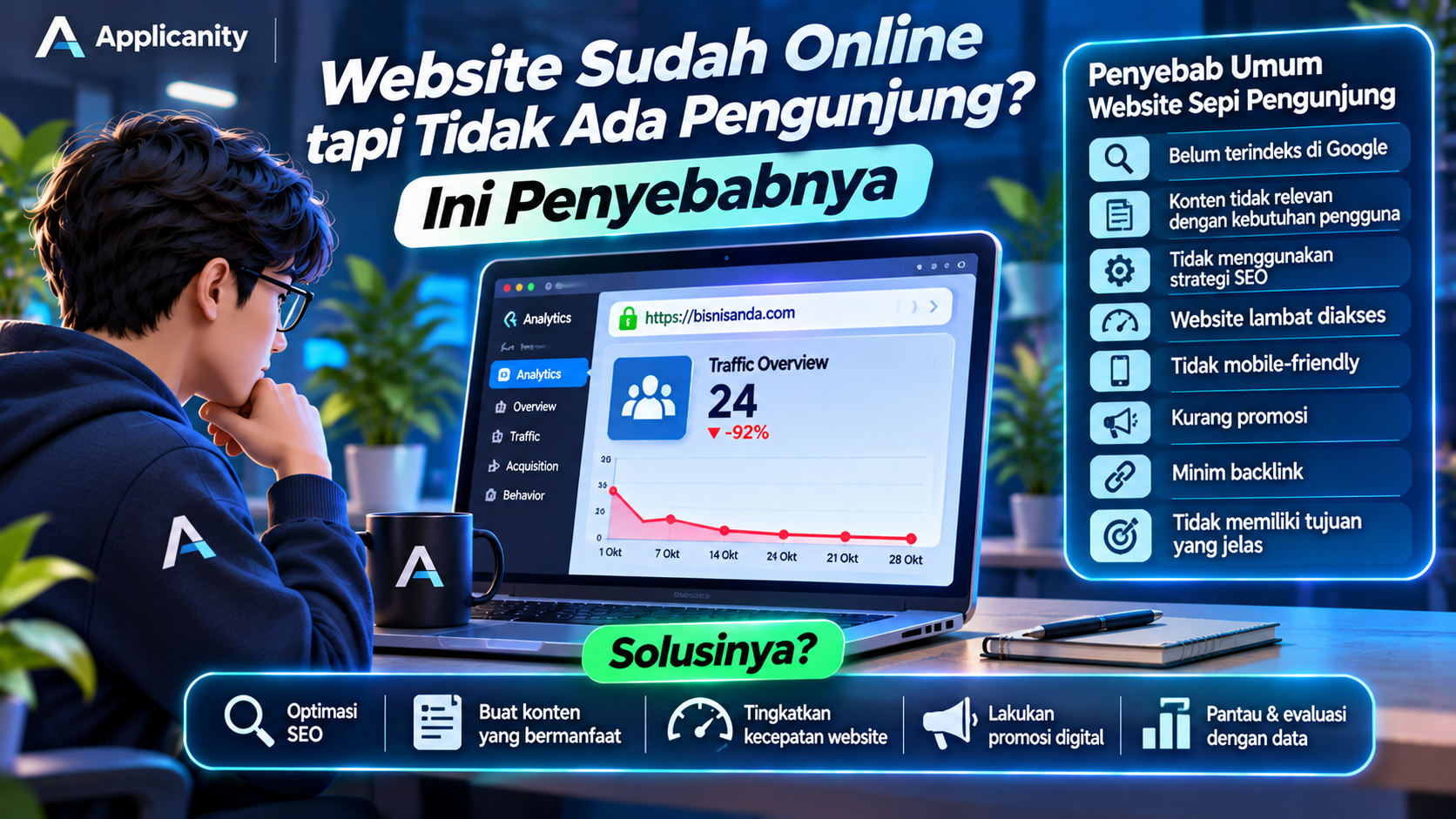
Your website is finished, your domain is active, and people can access it through the internet. However, after several weeks or even months, your website still receives very little traffic. Does this sound familiar?
This is a common situation for website owners, especially businesses that are just starting to build their online presence. Many people assume that once a website is published, visitors will automatically start arriving. Unfortunately, that is not how it works.
Having a live website does not automatically mean people will know it exists. A website needs the right strategy to become discoverable, attract attention, and give visitors a reason to return.
Think about opening a physical store. You may have a beautiful building, good products, and everything ready for customers. But if there is no sign outside, no promotion, and no clear directions to your location, very few people may visit.
The same principle applies to websites.
So, why does a website receive little or no traffic after going live? More importantly, what can you do to fix it?
Let's explore the most common reasons.
1. Your Website Has Not Been Indexed by Google
One of the most common reasons a website receives no organic traffic is that its pages have not been indexed by Google.
What does indexing mean?
Google uses automated systems to discover, read, and store information from websites. This process involves two important steps:
-
Crawling: When Google discovers and visits a website page.
-
Indexing: When Google processes and stores information about that page in its search database.
If a page has not been indexed, it generally cannot appear in Google's search results.
This can happen for several reasons:
-
Your website is still very new.
-
Google has not discovered your pages yet.
-
You have not submitted a sitemap.
-
Your website contains settings that prevent search engines from indexing certain pages.
-
Technical issues are preventing Google from accessing your website.
How can you fix it?
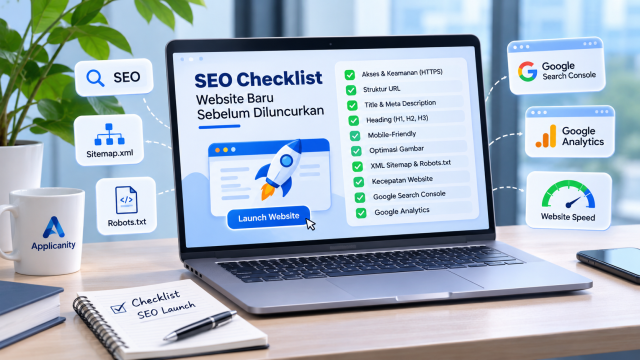
Start by registering your website with Google Search Console. This free tool helps website owners understand how Google discovers and processes their pages.
After verifying your website, submit your sitemap and use the URL Inspection feature to check whether important pages have been indexed.
Also, make sure that pages intended to appear in search results do not contain an accidental noindex directive.
2. Your Website Does Not Have the Content People Are Searching For
Your website may have an attractive design, smooth animations, and detailed company information. However, if its content does not answer what people are looking for, it may struggle to attract visitors from search engines.
For example, imagine a company that provides custom software development services. Its website only contains a company profile, a list of services, and contact information.
Those pages are useful, but potential customers may have other questions:
-
How much does custom software development cost?
-
What is the difference between WordPress and a custom website?
-
How does the development process work?
-
How long does it take to build an application?
-
What features can be included?
If your website does not answer these questions, visitors may choose another website that provides more useful information.
This is why content is an important part of attracting website traffic.
How can you fix it?
Create articles that address common questions and problems faced by your potential customers.
For example, if your business operates in the technology industry, you could publish articles about:
-
How to choose a website development company.
-
WordPress vs custom website development.
-
How to improve website security.
-
How much does a web application cost?
-
Common mistakes when building a business website.
Useful content can attract visitors while helping your business build credibility and trust.
3. You Are Not Using an SEO Strategy
SEO, or Search Engine Optimization, is the process of improving a website so that it can be discovered more easily through search engines such as Google.
When someone searches for something on Google, the search engine displays pages that it considers relevant to the user's query.
For example, someone searches for "business website development services." Google will show pages that appear relevant to that search.
If your website offers the same service but does not have proper SEO optimization, it may struggle to compete in search results.
Some common SEO mistakes include:
-
Not targeting relevant keywords.
-
Using page titles that do not describe the content.
-
Ignoring meta descriptions.
-
Having an inconsistent heading structure.
-
Uploading images without relevant alt text.
-
Not using internal links.
-
Publishing content that is too short or lacks useful information.
How can you fix it?
Start with keyword research. Find out what words and phrases your potential customers use when searching for your products or services.
Once you have identified relevant keywords, use them naturally in your page titles, headings, article content, URLs, and page descriptions.
Avoid excessive keyword repetition just to improve search rankings. Your content should remain natural, readable, and genuinely helpful.
4. Your Website Does Not Have a Blog or Article Section
Many business websites only contain a few main pages, such as Home, About Us, Services, and Contact.
These pages are usually enough to introduce a company. However, if you want to attract visitors consistently from Google, your website needs more relevant content.
A blog gives your website more opportunities to appear in different search queries.
For example, a website development company could publish articles about website security, website performance, hosting services, and content management.
Each article can target a different audience and answer a different question.
A blog can also improve your company's credibility. Visitors can see that your business does not simply sell services but also understands the industry.
How can you fix it?
Create a consistent publishing schedule. You do not need to publish articles every day. You can start with one or two high-quality articles each week.
Make sure every article:
-
Focuses on a clear topic.
-
Answers a specific user question.
-
Has an understandable title.
-
Uses a clear heading structure.
-
Includes supporting images when necessary.
-
Links to relevant service pages.
Remember, publishing one useful article is often better than publishing several articles filled with general information that does not solve any real problem.
5. Your Website Loads Too Slowly
Website speed plays an important role in the visitor experience.
Imagine someone opening your website but having to wait five to ten seconds just to see the homepage. Many visitors will simply close the page and look for another website.
Slow website performance can be caused by several factors:
-
Images have excessively large file sizes.
-
The hosting server has limited resources.
-
Too many plugins or scripts are running.
-
JavaScript is being used inefficiently.
-
Server configuration is not optimized.
-
Caching is not enabled.
-
CSS and JavaScript files have not been optimized.
Slow performance can make visitors uncomfortable and may also affect your website's ability to compete in search results.
How can you fix it?
Use Google PageSpeed Insights to evaluate your website performance.
Here are several practical improvements:
-
Compress images before uploading them.
-
Use modern image formats such as WebP or AVIF.
-
Enable website caching.
-
Remove unnecessary scripts.
-
Choose hosting resources that match your website's needs.
-
Optimize your server configuration.
-
Consider using a CDN when appropriate.
Do not focus only on how your website looks. Make sure visitors can access information quickly and comfortably.
6. Your Website Is Not Mobile-Friendly
Many people now access the internet using smartphones. Because of this, your website should work properly on different screen sizes.
A website that looks great on a desktop computer may not provide a good experience on a smartphone.
Some common mobile usability problems include:
-
Text that is too small.
-
Buttons that are difficult to tap.
-
Images extending beyond the screen.
-
Navigation menus that do not work properly.
-
Visitors having to zoom in to read information.
-
Page layouts that appear broken.
These problems can encourage visitors to leave your website before exploring its content.
How can you fix it?
Make sure your website uses responsive design.
Responsive design allows a website's layout to adjust automatically based on the screen size of the device being used.
Test your website on different devices, especially smartphones. Check the homepage, navigation menu, contact forms, WhatsApp buttons, and service pages.
Do not rely only on desktop previews when evaluating your website.
7. You Never Promote Your Website
Publishing a website does not mean people will automatically discover it.
One common mistake among business owners is relying entirely on Google to bring visitors to their websites.
In reality, there are many other channels you can use to introduce your website to potential customers.
For example:
-
Social media platforms such as Instagram, Facebook, and LinkedIn.
-
Relevant online communities.
-
Email marketing.
-
Discussion forums.
-
Trusted online business directories.
-
Partnerships with other websites or media platforms.
Imagine publishing a new article on your website. Instead of waiting for Google to discover it, you can also share the article through your company's social media accounts.
This gives your website more opportunities to receive traffic from different sources.
How can you fix it?
Create a simple website promotion strategy. Whenever you publish new content, share it through the communication channels your target audience already uses.
Make sure your promotions are relevant and not excessive. The goal is to provide useful information, not simply distribute links everywhere.
8. Your Website Does Not Have Backlinks
A backlink is a link from another website that points to your website.
Backlinks can help search engines understand the relationships between websites and are among the signals considered when evaluating page quality and authority.
For example, a technology blog writes an article about your company's services and includes a link to your official website.
That link is a backlink.
However, not all backlinks provide the same value. Links from relevant and reputable websites are generally more valuable than links from low-quality websites or pages created only to manipulate search rankings.
How can you fix it?
Build backlinks naturally through relevant activities, such as:
-
Creating useful content that others may want to reference.
-
Contributing articles to other websites.
-
Collaborating with business partners.
-
Receiving reviews or mentions from media and communities.
-
Listing your website in trusted business directories.
Avoid purchasing large numbers of backlinks from questionable sources. This approach can create risks for your website's backlink profile.
9. Your Website Has Many Pages but Low-Quality Content
Having hundreds of pages does not automatically mean your website will receive more visitors.
Some websites publish many articles, but most of them provide very little useful information. Others repeat the same topic using slightly different wording.
This type of content does not provide much value to visitors.
Google aims to display information that is relevant, useful, and trustworthy. Publishing large amounts of low-quality content is therefore not a good long-term strategy.
How can you fix it?
Review the content across your website.
Check whether each page is still relevant, contains sufficient information, and genuinely answers the visitor's needs.
If you find articles that cover almost identical topics, consider combining or updating them. If a page is no longer relevant, evaluate whether it should be improved or removed with proper URL handling.
Focus on content quality rather than simply increasing the number of pages.
10. You Never Monitor Website Traffic
How can you know whether your website strategy is working if you never check its performance?
Some website owners only check whether their website is accessible. However, there is much more information available that can help you understand visitor behavior.
For example:
-
How many visitors does your website receive?
-
Where do those visitors come from?
-
Which pages receive the most traffic?
-
What search keywords bring people to your website?
-
How many visitors use smartphones?
-
Do visitors take actions such as contacting your business?
Without this information, it becomes difficult to identify what needs improvement.
How can you fix it?
Use the following website analytics tools:
Google Analytics 4 (GA4)
This tool helps you understand visitor activity, traffic sources, page views, and interactions with your website.
Google Search Console
This tool helps you monitor your website's performance in Google Search, including clicks, impressions, average search position, and indexing issues.
Google PageSpeed Insights
This tool helps you evaluate website performance and page loading speed.
Together, these tools provide useful data that can help you make better decisions instead of relying on assumptions.
11. Your Website Does Not Have a Clear Purpose
A website should be more than a place to display company information. It should also have a clear purpose.
Do you want to attract potential customers? Increase sales? Receive consultation requests? Or introduce your company's services?
If you do not define these goals, your website may become a collection of pages that do not guide visitors toward any meaningful action.
For example, someone visits your service page, reads the information, but cannot find a button to contact your sales team.
You may have just lost a potential customer.
How can you fix it?
Decide what you want visitors to do after reading your website content.
Some examples include:
-
Contact us.
-
Request a free consultation.
-
Get a price quotation.
-
View our product catalog.
-
Create an account.
-
Purchase a product.
Use clear buttons and messages known as Calls to Action (CTA).
Make sure these buttons are easy to find and direct visitors to the correct page or process.
How to Start Increasing Your Website Traffic
After understanding the reasons above, you do not need to fix everything at once. Start with the most important problems and give your improvements enough time to produce results.
Here is a simple action plan.
Stage 1: Check your website's technical condition
-
Make sure your website is accessible.
-
Check whether important pages are indexed by Google.
-
Make sure your website uses HTTPS.
-
Test your website loading speed.
-
Check whether the mobile layout works properly.
Stage 2: Improve content and SEO
-
Identify your main target keywords.
-
Improve page titles and descriptions.
-
Create content that answers user questions.
-
Add relevant internal links.
-
Update outdated information.
Stage 3: Start promoting your website
-
Share articles on social media.
-
Introduce your website to existing customers.
-
Build partnerships with relevant websites.
-
Create content that matches your target audience.
Stage 4: Monitor and evaluate performance
-
Check traffic using Google Analytics.
-
Monitor search performance using Search Console.
-
Identify your most popular pages.
-
Review pages that are not receiving traffic.
-
Make improvements regularly.
How Long Does It Take for a Website to Get Visitors from Google?
This is a common question, especially among business owners who have recently launched a website.
Unfortunately, there is no guaranteed timeline for receiving traffic from Google.
A new website may need time to be discovered and indexed. After that, its pages still need to compete with other websites to achieve good positions in search results.
SEO performance is influenced by several factors, including:
-
Keyword competition.
-
Content quality and relevance.
-
Website technical condition.
-
Website reputation.
-
Consistency in publishing and updating content.
For this reason, SEO should be treated as a long-term investment rather than an instant method of generating thousands of visitors within a few days.
If you need faster results, your business can consider digital advertising platforms such as Google Ads. However, advertising and SEO work differently. Paid advertising can generate traffic while your campaigns are active, while SEO focuses on building long-term organic visibility.
Conclusion
A website that is live but receives little or no traffic does not necessarily mean the website has failed. It may simply be difficult for Google to discover, lack content that matches user needs, have poor SEO optimization, or receive very little promotion.
Building a website is only the first step in establishing an online presence. After publishing it, there is still important work to do, including technical optimization, content creation, promotion, and performance evaluation.
Remember, a good website is not simply one that looks attractive. It should also be easy to discover, provide useful information, and help your business achieve its goals.
If your business website has been online for months but still does not deliver the results you expect, it may be time to evaluate its performance and develop a better strategy.
Applicanity helps businesses build and develop digital solutions, from corporate websites to custom web applications. Visit applicanity.com to learn more about website development and digital solutions for your business.