ChatApp with WebSocket, NodeJS, and MySQL: Building a Real-Time Chat Application
A chat application is one of the most common real-time use cases in modern web development. When one user sends a message, others can instantly see it without refreshing the page. This is made possible using WebSocket, a protocol that enables two-way communication between client and server.
In this article, we’ll build a simple ChatApp using WebSocket, NodeJS, and MySQL, showing how these three work together to create a fast and efficient real-time messaging system.
What Is WebSocket?
WebSocket allows full-duplex communication, meaning the client and server can send messages to each other at any time using a single TCP connection. Unlike HTTP, WebSocket does not require constant re-requests.
This makes it ideal for chat systems, gaming servers, or live dashboards.
Why NodeJS and MySQL?
-
NodeJS handles real-time connections very efficiently because it is non-blocking.
-
MySQL stores user data and message history securely.
Together, they form a solid base for scalable real-time applications.
Project Structure
chatapp/
|
|-- server.js
|-- package.json
|-- public/
| |-- index.html
| |-- script.js
|-- db/
|-- database.sql
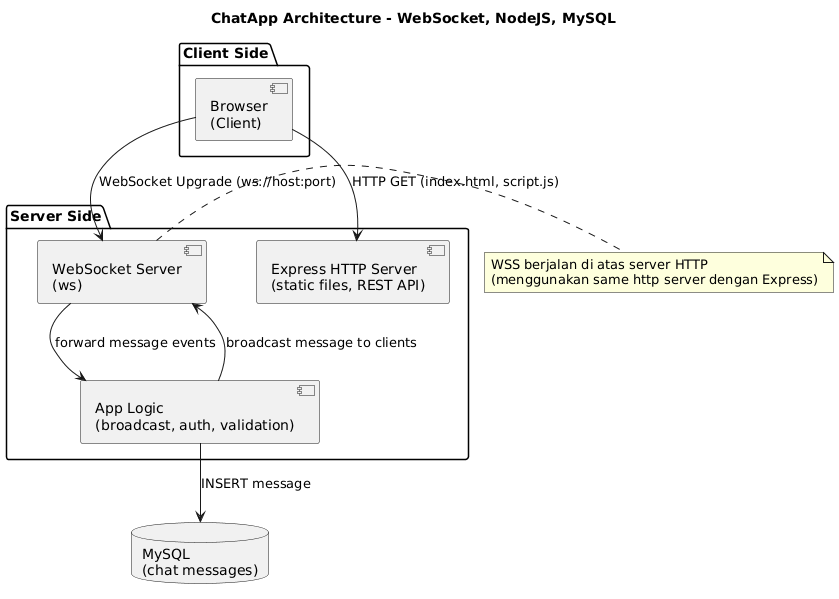
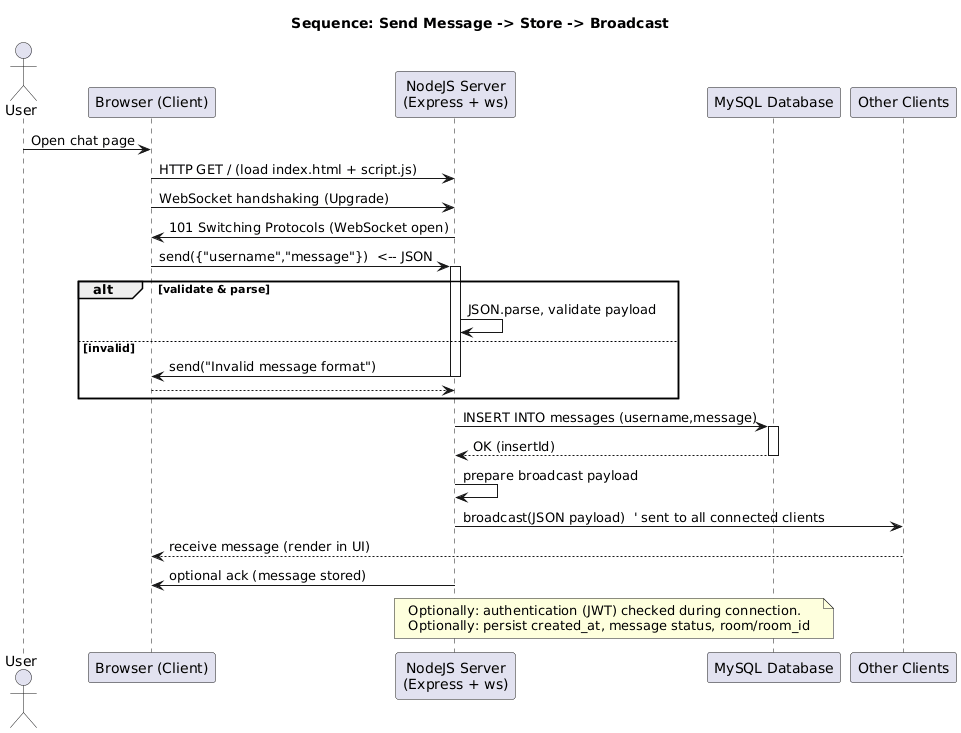
Diagram
1. MySQL Database Setup
CREATE DATABASE chatapp;
USE chatapp;

CREATE TABLE messages (
  id INT AUTO_INCREMENT PRIMARY KEY,
  username VARCHAR(50),
  message TEXT,
  created_at TIMESTAMP DEFAULT CURRENT_TIMESTAMP
);
2. NodeJS Server
Install dependencies:
npm init -y
npm install express ws mysql
Then add your WebSocket and database logic in server.js (same as Indonesian version).
3. Client Side
Create simple HTML and JavaScript files for real-time communication. Each message sent by a user is broadcasted to all connected clients instantly.
4. Run and Test
Run your server using:
node server.js
Then open several browser tabs and test sending messages. You’ll see them appear instantly across all tabs.
Conclusion
Using WebSocket, NodeJS, and MySQL, you can build a basic but powerful real-time chat app. This is a strong foundation for more complex systems such as chat rooms, private messaging, and user authentication.