What Is Local AI? Understanding AI That Runs on Your Own Computer
When people hear the term Artificial Intelligence (AI), they often think of ChatGPT, Gemini, or other AI services accessed through the internet. You simply open a website or application, type a question, and the AI provides an answer.
But did you know that AI can also run directly on your own computer without constantly sending requests to a service provider's servers?
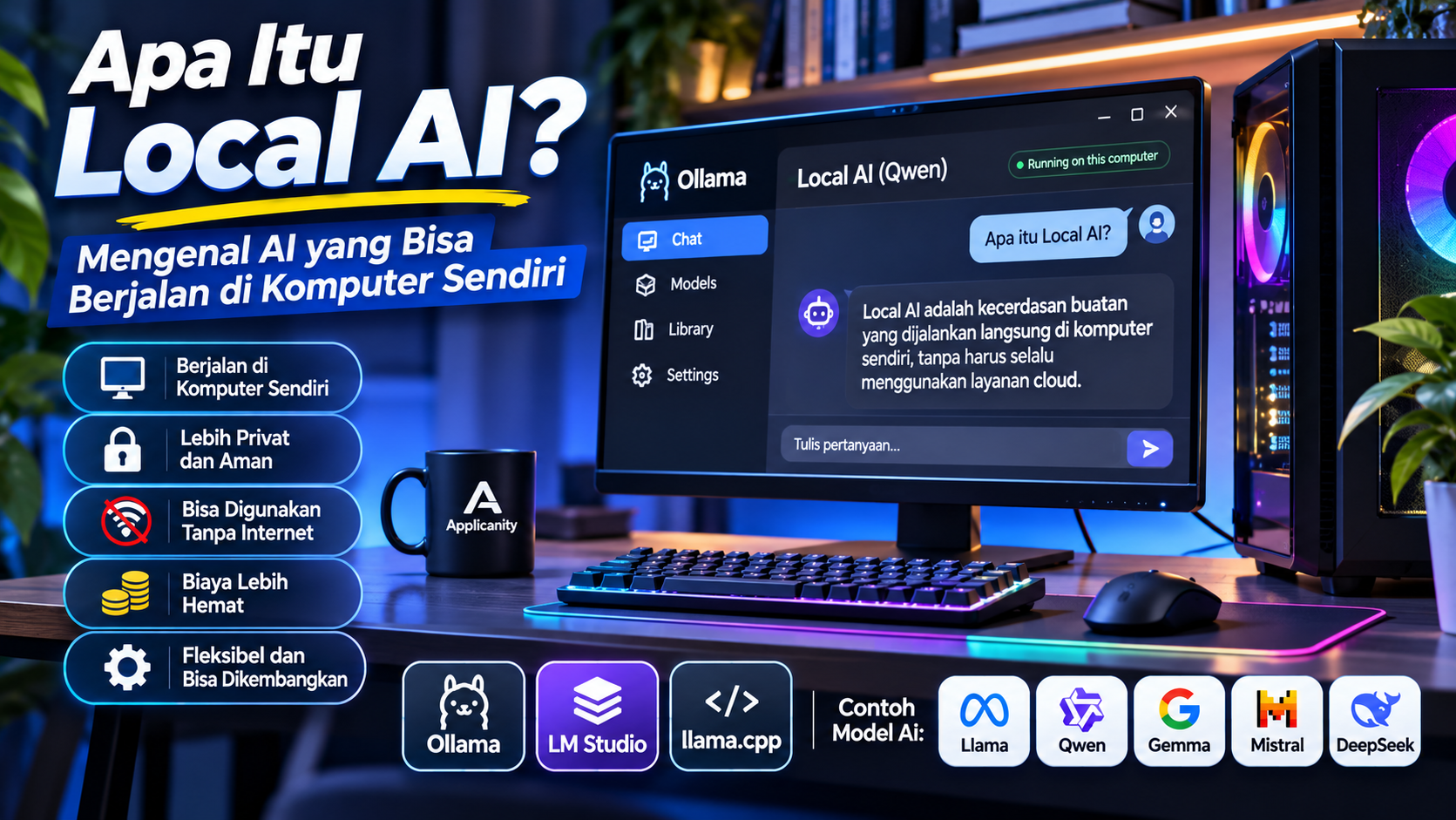
This technology is known as Local AI. With Local AI, users can run artificial intelligence models on their own computers or private servers. This means most of the AI processing can take place using hardware they already own.
Local AI is becoming increasingly interesting because personal computers are more powerful, AI models are available in different sizes, and several applications make installation easier.
So, what exactly is Local AI? How does it work? What are its advantages, and can an ordinary computer run it? Let's explore the basics.
What Is Local AI?
Local AI is a technology that allows artificial intelligence models to run directly on a user's own device, such as a desktop computer, laptop, or private server.
For example, when you use a cloud-based AI service, the question you type is usually sent over the internet to the service provider's servers. Those servers process your request and send the response back to your device.
With Local AI, the model has already been downloaded and is running on your own computer. When you submit a question, your computer processes it using its CPU, GPU, RAM, or a combination of these components.
This approach allows you to interact with AI without always needing an internet connection, as long as the required model is already available on your device.
For example, you can download a language model, run it through a suitable application, and use it to:
-
Answer questions.
-
Help write articles.
-
Summarize documents.
-
Assist with programming.
-
Translate text.
-
Analyze information.
-
Support everyday tasks.
In other words, Local AI does not mean building an AI model from scratch. You use a model that has already been trained and run it on your own computer.
How Does Local AI Work?
To understand Local AI, it helps to learn a few basic terms commonly used in artificial intelligence.
1. AI Models
An AI model is a system trained on large amounts of data to recognize patterns and generate responses based on user input.
For conversational AI, these models are commonly known as Large Language Models (LLMs).
Examples of model families frequently used for Local AI include:
-
Llama.
-
Qwen.
-
Gemma.
-
Mistral.
-
Phi.
-
DeepSeek.
Each model has different capabilities, sizes, hardware requirements, and licensing terms.
Some models are better suited for general conversations, while others are designed to assist with programming or understand images.
2. Model Weights
AI models contain collections of numerical values called weights.
These weights represent what the model has learned during its training process. When a model runs, the computer needs to load these weights into memory so the AI can generate responses.
Larger models generally require more memory.
For example, a model with several billion parameters usually requires more resources than a smaller model with fewer parameters.
3. Inference
Inference is the process of using a trained AI model to generate an answer based on a user's prompt or question.
For example, you ask:
"Explain what PHP is in simple language."
Your computer processes the question using the model currently running and generates an answer based on patterns learned during training.
This is what happens every time you send a request to Local AI.
4. Applications That Run AI Models
An AI model cannot always be used simply by downloading its files. You need an application or runtime to load the model and perform the inference process.
Some popular tools for this purpose include Ollama, LM Studio, and llama.cpp.
These applications connect AI models with your computer's hardware, allowing you to interact with them.
Local AI vs. Cloud AI: What Is the Difference?
Local AI and Cloud AI both allow users to benefit from artificial intelligence. The main difference is where the processing takes place and what infrastructure is used.
| Aspect | Local AI | Cloud AI |
|---|---|---|
| Processing location | Your own computer or server | Service provider's servers |
| Internet connection | Not always required after setup | Usually required |
| Hardware | Uses your own hardware | Uses provider infrastructure |
| Data privacy | Data can be processed locally | Data is sent to the service provider |
| Cost | Hardware and electricity expenses | May involve subscriptions or API fees |
| Maintenance | You manage hardware and models | Mostly managed by the provider |
| Performance | Depends on your hardware | Depends on the service and connection |
| Model capacity | Limited by your hardware | Can use large server-based models |
For example, when you use ChatGPT through its website, the AI processing takes place on the service's infrastructure.
However, if you download a Qwen or Llama model and run it through Ollama, the AI processing can take place directly on your computer.
Both approaches have their own advantages. Local AI provides more control over the processing environment, while Cloud AI offers convenience because users do not need to prepare dedicated hardware.
What Are the Advantages of Local AI?
Local AI offers several advantages that make it interesting for individual users, developers, and businesses.
1. Data Can Be Processed on Your Own Device
One of the main reasons people use Local AI is greater control over their data.
For example, you may have internal company documents, application source code, or work notes that you do not want to send to an external service.
With a Local AI application that operates entirely on your device, those documents can be processed without being sent to an AI provider's servers.
This can be especially useful when working with sensitive information.
However, Local AI does not automatically guarantee complete security. Security also depends on the application, network configuration, operating system, and how the device is managed.
2. It Can Work Without an Internet Connection
Once the AI model has been downloaded and the application is installed, some Local AI solutions can operate without an internet connection.
You can continue asking questions, requesting writing assistance, or processing local documents even when you are offline.
An internet connection is generally still needed to download models, search for new models, update applications, or perform other online activities.
3. It Does Not Always Require a Subscription
Many AI models can be downloaded and used without a subscription.
You may still need to spend money on hardware, additional RAM, or storage capacity. Electricity consumption is also part of the operating cost.
However, once your hardware is ready, you do not necessarily need to pay for every request as you might with some cloud-based API services.
Always check the model's licensing terms, especially if you plan to use Local AI for commercial purposes.
4. It Can Be Used to Build Your Own Applications
Local AI is not limited to chat applications.
Some platforms provide local APIs that developers can use to connect AI models to their own applications.
For example:
-
Integrating AI into PHP or Laravel applications.
-
Building internal company chatbots.
-
Creating document-reading assistants.
-
Developing information search features.
-
Building programming assistants.
-
Automating repetitive tasks.
This makes Local AI a useful component in modern application development.
5. Greater Control and Flexibility
Users can choose which model to run, switch models depending on their needs, and adjust certain configurations.
For example, you might use a smaller model for simple tasks and a larger model for work that requires more advanced reasoning.
This flexibility may not always be available with AI services that only provide access to selected models.
What Are the Disadvantages of Local AI?
Although Local AI is interesting, it is not a perfect solution. There are several things to consider before using it.
1. It Requires Suitable Hardware
Running AI on your own computer requires hardware resources.
The most important components include:
-
RAM for storing models and data being processed.
-
VRAM for helping the GPU run models.
-
CPU for additional processing.
-
GPU for accelerating inference.
-
Storage for keeping model files.
If your computer has limited specifications, generating responses may feel slow.
2. Smaller Models May Not Match Larger Models
AI models come in different sizes. Smaller models are usually lighter and easier to run, but they may not perform as well as larger models on certain tasks.
For example, a small model may be good enough for simple questions but may not be ideal for analyzing complex source code.
That is why choosing the right model for your needs is important.
3. It Requires Maintenance and Updates
With Cloud AI, most of the infrastructure is managed by the service provider.
With Local AI, users are responsible for managing applications, models, storage, configurations, and updates.
For business use, these responsibilities should be planned carefully to keep the system running properly.
4. Not Every Model Can Be Used Without Restrictions
The terms open-source and open-weight are often used in the AI world, but they do not always mean the same thing.
Some models provide downloadable weights but still have specific licensing requirements.
Before using a model for a business or commercial product, make sure you understand its license.
What Computer Specifications Are Needed to Run Local AI?
One of the most common questions is: can an ordinary computer run Local AI?
The answer is yes, but your computer's capabilities will determine which model sizes you can run and how quickly they respond.
You do not always need an expensive GPU. Some smaller models can run using a CPU and system RAM, although performance may be slower.
Here is a general starting point.
| Component | Basic Starting Point | More Comfortable |
|---|---|---|
| Processor | Modern CPU with several cores | Modern CPU with more cores |
| RAM | 8 GB | 16–32 GB or more |
| GPU | Not required for small models | GPU with 8–12 GB VRAM or more |
| Storage | SSD with available space | Larger-capacity SSD |
| Operating System | Supported Windows, Linux, or macOS | A currently supported OS version |
These specifications are general guidelines, not strict requirements for every model.
Actual requirements depend on model size, quantization, context length, the application being used, and whether processing takes place on the CPU, GPU, or both.
What Is VRAM and Why Does It Matter?
VRAM is dedicated memory found on a graphics card or GPU.
When running Local AI, VRAM is used to store parts of a model that are processed by the GPU.
More VRAM allows a larger portion of the model to be loaded onto the GPU, which can help improve processing speed.
As a general example:
-
A GPU with 4 GB VRAM is more suitable for trying relatively small models.
-
An 8 GB GPU can provide more options for lightweight and medium-sized models.
-
A 12 GB GPU can run a wider range of models, depending on their size and configuration.
-
GPUs with more VRAM provide additional flexibility for heavier models.
However, VRAM is not the only important factor. System RAM also plays a significant role, especially when parts of a model need to be processed using system memory.
What Is Quantization?
You may encounter terms such as Q4, Q5, or Q8 when searching for Local AI models.
These terms are related to quantization, a process that reduces the numerical precision used to store model weights.
In simple terms, quantization makes model files smaller, allowing them to run more easily on devices with limited memory.
For example, a model using a particular quantization format may require less memory than a version with higher numerical precision.
However, there is a trade-off. Quantization can affect the quality of model responses depending on the method and compression level.
That is why you should not choose a model based only on its file size. Consider its response quality and processing speed as well.
Popular Software for Running Local AI
Several applications can help users run AI models on their own computers. Each has a different approach and set of advantages.
1. Ollama
Website: https://ollama.com/
Ollama is one of the popular platforms for running AI models locally.
It provides a relatively simple way to download, run, and manage different AI models through a terminal or applications integrated with it.
Here is a simple example of running a model:
ollama run qwen3
Once the model is available and successfully running, you can interact with it directly through the terminal.
Ollama also provides a local API that developers can use to connect models with other applications.
2. LM Studio
Website: https://lmstudio.ai/
If you prefer applications with a graphical interface, LM Studio is another option.
LM Studio provides an interface for discovering, downloading, managing, and running AI models.
Users do not always need to use a terminal to interact with a model. Once the model has been downloaded and loaded into memory, you can start using it through the chat interface.
LM Studio also supports offline model usage after the required model files are available on your computer.
3. llama.cpp
Website: https://github.com/ggml-org/llama.cpp
llama.cpp is a project focused on running language models across different types of hardware.
Unlike applications primarily designed for general users, llama.cpp offers greater flexibility for technical users and developers.
It supports several processing backends, including CPUs and multiple GPU platforms. It also supports different quantization levels to help run models on devices with limited memory.
Everyday Use Cases for Local AI
Local AI is not just a technology for experimentation. It can assist with many everyday tasks.
1. Writing and Content Creation
You can use Local AI to create article outlines, improve grammar, summarize written content, or generate content ideas.
For example, a website owner can run a local model to help prepare article drafts before editing them.
2. Programming Assistance
Developers can use local AI models to explain code, create example functions, identify simple errors, or suggest improvements.
This can be useful when working with internal source code that should not be sent to external services.
However, all generated results should still be reviewed and tested before being used in production applications.
3. Reading and Summarizing Documents
Local AI can be combined with technologies such as Retrieval-Augmented Generation (RAG) to help users find information within document collections.
For example, a company can provide its Standard Operating Procedures (SOPs), work guidelines, or internal documentation so employees can ask questions based on those materials.
With the right configuration, documents can remain within the local environment.
4. Building Internal Chatbots
Businesses can use Local AI to build chatbots that help employees access internal information.
For example, a chatbot can answer questions about work procedures, product information, or system usage guidelines.
5. Supporting Learning and Education
Local AI can also work as a learning assistant.
Students can use it to request explanations of programming concepts, understand lessons, generate practice questions, or summarize notes.
Since it can run locally, users do not always need an internet connection when they want to study.
Is Local AI Safe for Personal and Business Data?
Local AI can provide better privacy control because data can be processed directly on your own device.
However, running AI locally does not automatically make the entire system completely secure.
Here are several important things to consider:
-
Use applications from official sources.
-
Download models from trusted sources.
-
Check model permissions and licenses.
-
Restrict network access if the model is intended for local use only.
-
Do not expose a Local AI API to the internet without proper protection.
-
Protect your computer with passwords and security updates.
-
Back up important data and configurations.
Also pay attention to additional applications used to access your models. If you install plugins, extensions, or automation systems, make sure they come from trusted sources.
Local AI security is not only about the model itself. It also involves the entire system running it.
Will Local AI Replace Cloud AI?
Most likely, both technologies will continue to be used side by side.
Local AI offers advantages in device control, local data processing, and usage flexibility. Cloud AI, on the other hand, provides access to large-scale infrastructure and models that may be too demanding for personal computers.
For example:
-
Local AI is suitable for offline work and internal documents.
-
Cloud AI is suitable for tasks requiring very large models.
-
Local AI can be used for experimentation and application development.
-
Cloud AI can be used when a ready-to-use service is needed.
Both technologies can even be combined in a single system. An application can use Local AI for routine tasks and switch to Cloud AI when additional capabilities are required.
Conclusion
Local AI is a technology that allows users to run artificial intelligence models directly on their own computers or private servers.
With this technology, users can take advantage of AI for writing, programming assistance, document summarization, internal chatbots, and even building their own applications.
Its main advantages include greater control over data, the ability to work without an internet connection once a model is available, and the flexibility to choose which models to use.
However, Local AI also has limitations. Model size, RAM capacity, VRAM, GPU performance, and system configuration all affect the overall experience.
If you want to get started, Ollama and LM Studio are two relatively accessible options to explore. Once you understand the basics, you can expand your use of Local AI through APIs and integrate it with your existing applications.
Local AI gives everyone an opportunity to benefit from artificial intelligence without always depending on cloud-based services. Your personal computer is no longer just a tool for getting work done; it can also become a place to run your own AI assistant.