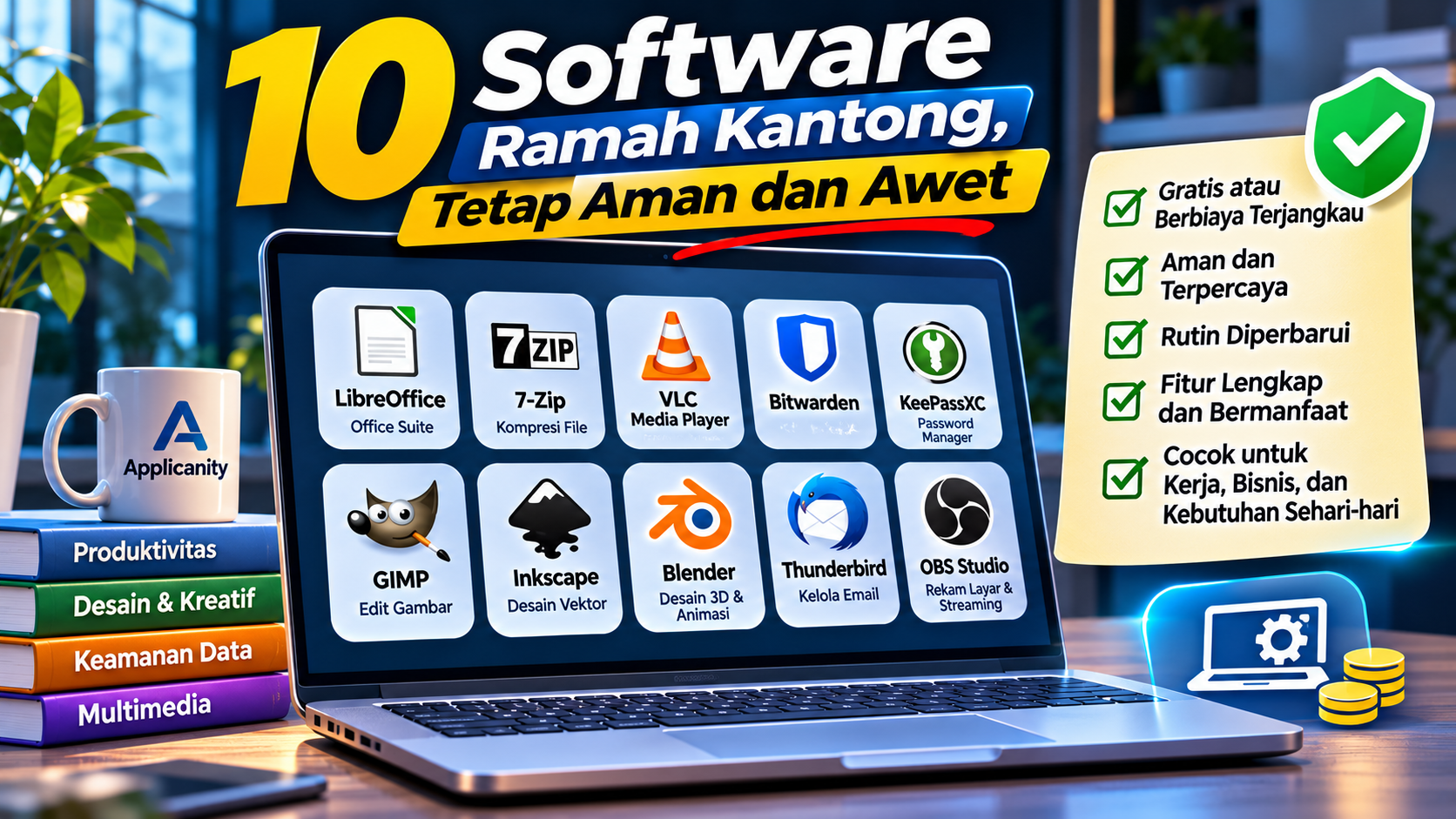
10 Budget-Friendly Software That Are Safe and Built to Last
In today's digital world, software plays an important role in almost every type of work. From creating documents and managing data to editing images, organizing passwords, and producing videos, the right applications can make daily tasks faster and more efficient.
Unfortunately, not all software is affordable. Some professional applications require monthly or yearly subscriptions. When used across multiple computers or throughout a business, these costs can become a significant expense.
However, you do not always need expensive software to achieve good results. Many free and open-source applications offer useful features, have established user communities, and continue to receive updates from their developers.
Still, choosing free software requires care. Applications that no longer receive updates may contain security vulnerabilities. Downloading software from unofficial websites can also expose your computer to harmful programs.
This article introduces ten budget-friendly software options for everyday and professional needs. The list covers office productivity, security, graphic design, multimedia, and content creation.
Why Should You Choose Budget-Friendly Software?
Budget-friendly software is not simply an application that costs nothing. A good application should also provide value over the long term.
Here are several reasons why choosing the right software matters.
1. Reduce Operational Expenses
Software licenses can become recurring expenses, especially for businesses with many employees and computers.
Using free applications or more affordable alternatives can help reduce operational costs. The saved budget can be allocated to other priorities, such as business development, hardware upgrades, or employee training.
2. Get the Features You Actually Need
Free software does not always mean limited functionality. Some open-source applications provide enough features for professional tasks.
For example, office applications can be used to create reports, spreadsheets, and presentations without purchasing an expensive office suite.
3. Avoid Depending on a Single Vendor
Open-source software allows users to study how an application works and, depending on its license, modify or develop its source code.
This can provide greater flexibility, especially for companies that want more control over the systems they use.
4. Choose Tools That Match Your Requirements
Not everyone needs software with hundreds of advanced features. Choosing applications that match your actual requirements can simplify workflows and prevent unnecessary expenses.
10 Budget-Friendly Software Worth Considering
Here are ten applications that can serve as alternatives to paid software for different purposes.
1. LibreOffice – An Alternative Office Suite
<Software: LibreOffice>
<URL: https://www.libreoffice.org/>
If you regularly create documents, work with numbers, or prepare presentations, LibreOffice is one of the best options to consider.
LibreOffice is a free and open-source office suite. It includes several main applications:
-
Writer for documents such as letters, reports, and proposals.
-
Calc for spreadsheets and data management.
-
Impress for presentations.
-
Draw for diagrams and simple illustrations.
-
Base for database management.
-
Math for mathematical formulas.
LibreOffice can be a practical alternative for basic and intermediate tasks commonly performed using Microsoft Office.
Why is it worth choosing?
-
Free to use.
-
Supports multiple document formats.
-
Includes word processing, spreadsheet, and presentation tools.
-
Available on several operating systems.
-
Continuously developed.
Things to consider:
Some Microsoft Office documents with complex formatting, specific macros, or advanced layouts may not appear exactly the same when opened in LibreOffice.
If you frequently exchange documents with clients or colleagues who use Microsoft Office, check the formatting before sending the final version.
2. 7-Zip – Free File Compression Software
<Software: 7-Zip>
<URL: https://www.7-zip.org/>
Have you ever received a large file and needed to compress it before sending it? Or wanted to combine multiple files into a single archive?
7-Zip is a file compression utility that can help with these tasks.
It supports various archive formats, including 7z, ZIP, TAR, GZIP, and several others.
One of its advantages is the 7z format, which can provide high compression depending on the type of files being processed.
Why is it worth choosing?
-
Free and open-source.
-
Lightweight and resource-efficient.
-
Supports multiple archive formats.
-
Can create password-protected archives.
-
Suitable for personal and professional use.
Things to consider:
If you use encryption to protect your files, choose strong encryption settings and avoid sharing the password through the same channel as the archive.
Remember that compression does not always significantly reduce file size. Videos, images, and documents that are already compressed may only become slightly smaller.
3. VLC Media Player – A Versatile Audio and Video Player
<Software: VLC Media Player>
<URL: https://www.videolan.org/vlc/>
VLC Media Player is one of the most widely recognized multimedia applications among computer users.
It can play various video and audio formats without requiring users to manually install multiple additional codecs.
VLC also provides useful features such as subtitle settings, playback speed controls, and support for different media sources.
Why is it worth choosing?
-
Free and open-source.
-
Supports many multimedia formats.
-
Lightweight for everyday playback.
-
Available on multiple operating systems.
-
No subscription fees.
Things to consider:
VLC is a media player, not a professional video editing application. If you need to cut, arrange, or add effects to videos, use software specifically designed for video editing.
4. Bitwarden – Password Management for Multiple Accounts
<Software: Bitwarden>
<URL: https://bitwarden.com/>
Almost every digital activity now requires an account and password. These include email, social media, banking services, and work applications.
Using the same password across multiple accounts can increase your risk if one of those services experiences a data breach.
Bitwarden is a password management application that helps users store and organize their login information.
With a password manager, you do not need to remember every password manually. You only need to remember one strong master password to access your password vault.
Why is it worth choosing?
-
Offers a free usage option.
-
Supports password storage.
-
Provides browser and device autofill features.
-
Supports synchronization according to the selected plan.
-
Includes additional security features.
Things to consider:
Never use an easy-to-guess master password. Enable two-factor authentication when available and keep your account recovery methods secure.
A password manager helps organize passwords, but it does not automatically make all your accounts secure. Account security still depends on how users configure and protect them.
5. KeePassXC – An Offline Password Manager
<Software: KeePassXC>
<URL: https://keepassxc.org/>
Besides Bitwarden, there is another option for users who prefer storing passwords locally.
KeePassXC is an open-source password manager that stores login information in an encrypted database on the user's device.
You can manage passwords for multiple accounts without depending on a cloud-based password storage service.
Why is it worth choosing?
-
Free and open-source.
-
Stores password databases locally.
-
Supports database encryption.
-
Can be used without a cloud service account.
-
Suitable for users who prefer managing their own password storage.
Things to consider:
Because the database is stored locally, you are responsible for its backup and synchronization. If the database file is lost or damaged and no backup exists, the stored information may be difficult to recover.
Keep a copy of the database in a secure location and make sure your backup is not stored only on the same device.
6. GIMP – An Alternative Image Editing Application
<Software: GIMP>
<URL: https://www.gimp.org/>
For graphic design and image editing, GIMP is an interesting alternative to consider.
GIMP is an open-source image editing application with features for photo editing, image composition, color adjustment, and visual manipulation.
It can be used for tasks such as:
-
Editing product photos.
-
Creating website images.
-
Removing or replacing backgrounds.
-
Creating visual compositions.
-
Adjusting colors and lighting.
-
Producing simple graphic designs.
Why is it worth choosing?
-
Free and open-source.
-
Provides a wide range of image editing features.
-
Supports layers.
-
Suitable for different design requirements.
-
Available on multiple operating systems.
Things to consider:
GIMP has a different interface and workflow from Adobe Photoshop. New users may need time to learn its menus, tools, and editing process.
For professional projects that depend heavily on specific file formats or workflows, check file compatibility before using it in production.
7. Inkscape – Vector Graphic Design Software
<Software: Inkscape>
<URL: https://inkscape.org/>
While GIMP focuses more on pixel-based image editing, Inkscape is designed for vector graphics.
Vector graphics have an important advantage: they can be resized without losing image sharpness.
Inkscape is suitable for creating:
-
Logos.
-
Icons.
-
Illustrations.
-
Diagrams.
-
Posters.
-
Website graphic elements.
-
Simple print designs.
Why is it worth choosing?
-
Free and open-source.
-
Supports SVG format.
-
Suitable for logo and illustration design.
-
Can be used for digital and print projects.
-
Has an established user community.
Things to consider:
Inkscape is not a direct replacement for every feature found in professional design software. If you work with files from other applications, check export formats and compatibility before using them in production.
8. Blender – Professional 3D Software Without License Fees
<Software: Blender>
<URL: https://www.blender.org/>
If you are interested in 3D design, animation, or game asset creation, Blender is one of the most valuable applications to consider.
Blender is an open-source 3D application used for various creative tasks, from object modeling to animation production.
Some of its capabilities include:
-
3D modeling.
-
Texturing.
-
Rendering.
-
Animation.
-
Simulation.
-
Visual effects.
-
Game asset creation.
Why is it worth choosing?
-
Free and open-source.
-
Offers a comprehensive set of 3D features.
-
Used by creative communities around the world.
-
Supports different production workflows.
-
Suitable for learning and professional projects.
Things to consider:
Blender includes many features and requires time to learn. In addition, rendering and certain 3D tasks may require relatively powerful computer hardware.
If you are just getting started, learn the basic tools before moving on to complex projects.
9. Mozilla Thunderbird – Desktop Email Management
<Software: Mozilla Thunderbird>
<URL: https://www.thunderbird.net/>
For users who manage multiple email addresses, having everything in one application can make daily work more convenient.
Thunderbird is a desktop email application that allows users to manage multiple email accounts in one place.
It supports several useful tasks, including:
-
Reading and sending emails.
-
Managing multiple accounts.
-
Organizing email folders.
-
Searching messages.
-
Managing calendars and contacts through available features.
Why is it worth choosing?
-
Free and open-source.
-
Supports multiple email accounts.
-
Includes message management features.
-
Can be extended with certain add-ons.
-
Suitable for personal and professional use.
Things to consider:
Thunderbird is an email application, not an email service provider. You still need an email account from a provider such as Gmail, Outlook, or your company's email service.
Make sure your email server and authentication settings follow the instructions provided by your email service.
10. OBS Studio – Screen Recording and Live Streaming Software
<Software: OBS Studio>
<URL: https://obsproject.com/>
If you regularly create tutorials, record computer activities, deliver presentations, or livestream content, OBS Studio can be a very useful tool.
OBS Studio is a free and open-source application for screen recording and live streaming.
Some of its features include:
-
Screen recording.
-
Live streaming.
-
Multiple scene management.
-
Combining video and audio sources.
-
Microphone configuration.
-
Webcam integration.
-
Video quality settings.
Why is it worth choosing?
-
Free and open-source.
-
No license fees.
-
Provides comprehensive recording features.
-
Supports multiple streaming platforms.
-
Suitable for content creators, educators, and presentations.
Things to consider:
OBS Studio has many settings that may be confusing for new users. Recording quality is also affected by computer specifications, resolution, bitrate, and encoder configuration.
Start with simple settings and perform a test before recording or going live.
Comparison of 10 Budget-Friendly Software Options
Here is a summary of the ten applications discussed in this article.
| No. | Software | Main Purpose | License Cost |
|---|---|---|---|
| 1 | LibreOffice | Documents, spreadsheets, presentations | Free |
| 2 | 7-Zip | File compression | Free |
| 3 | VLC Media Player | Audio and video playback | Free |
| 4 | Bitwarden | Password management | Free with paid options |
| 5 | KeePassXC | Local password management | Free |
| 6 | GIMP | Image editing | Free |
| 7 | Inkscape | Vector graphic design | Free |
| 8 | Blender | 3D design and animation | Free |
| 9 | Thunderbird | Email management | Free |
| 10 | OBS Studio | Screen recording and streaming | Free |
Keep in mind that a free software license does not necessarily mean every operational requirement is free. Some services may charge for cloud storage, premium features, supporting hardware, or infrastructure.
Tips for Choosing Software That Is Safe and Reliable Long-Term
Choosing software is not only about price and the number of features. You should also make sure the application is secure, suitable for your needs, and likely to remain useful over time.
Here are several things to consider.
1. Download from Official Websites
Always download software from the developer's official website or a trusted application store.
Avoid downloading installers from unknown websites, especially if they offer premium versions for free or ask you to disable your antivirus.
Installers from unofficial sources may have been modified to include harmful programs.
2. Make Sure the Software Still Receives Updates
Software that receives regular updates is more likely to get bug fixes, compatibility improvements, and security patches.
Before choosing an application, check its update page or release history.
Do not choose software simply because it has been popular for many years. Make sure the project is still active and your device is still supported.
3. Check the Software License
Free does not always mean unrestricted use for every purpose.
Some applications are free for personal use but have different terms for commercial use. Other open-source applications allow usage and distribution according to their license requirements.
If the software will be used by a company or for client work, review the license first.
4. Check Hardware Compatibility
Good software is not necessarily suitable for every computer.
Check minimum system requirements, operating system support, RAM usage, storage requirements, and graphics card requirements.
If your device has limited specifications, choose a lightweight application that matches your computer's capabilities.
5. Prepare Backups for Important Data
Software can experience errors, files can become corrupted, and devices can fail.
For that reason, do not rely only on the application itself to protect important information. Create regular backups on separate storage or locations.
For password managers, work documents, databases, and design files, make sure you have a backup that can be restored.
6. Avoid Using Pirated Software
Using pirated software may seem like a way to save money initially. However, the risks can be much greater.
Pirated installers may contain malware, password stealers, or programs that damage your system. They may also miss official updates and create legal or licensing problems.
If the official price is too expensive, look for a free or open-source alternative that meets your requirements.
Is Free Software Suitable for Business Use?
The answer is yes, as long as the software meets your requirements and its license allows the intended use.
Many business tasks can be handled using free software. For example, creating reports with LibreOffice, managing email with Thunderbird, editing images with GIMP, or preparing presentations with an open-source office suite.
However, companies should still consider several factors:
-
Does the software provide the technical support you need?
-
Are its file formats compatible with clients and business partners?
-
Does the license allow commercial use?
-
Is sufficient documentation available?
-
Can the data be backed up and transferred?
-
Can the software be used by the entire team?
For more complex business requirements, paid software may sometimes be a better choice because it provides official support, specialized features, or required integrations.
The main goal is not to avoid every expense. It is to make sure that every expense provides real value.
Conclusion
Choosing software does not always mean purchasing expensive applications. There are many free and open-source options that can support everyday tasks and professional requirements.
LibreOffice, 7-Zip, VLC, Bitwarden, KeePassXC, GIMP, Inkscape, Blender, Thunderbird, and OBS Studio are examples of applications worth considering for different needs.
However, a free price tag is not the only measure of quality. You should also consider security, updates, licensing, compatibility, and long-term support.
Remember to download applications from official sources, update them regularly, and create backups for important data.
Good software is not necessarily the most expensive software. It is software that meets your needs, is safe to use, and remains reliable over the long term.