Is Your Website Vulnerable to Hacking? Recognize These 7 Warning Signs Before It's Too Late!
Introduction
Having a website has become essential for businesses, companies, organizations, and individuals who want to establish their presence online. A website is no longer just a place to display information. It can also serve as a communication platform, a customer service channel, and even a place to manage business transactions.
However, there is one important aspect that website owners often overlook: security.
Many people assume their websites are safe as long as they can still access them and everything appears normal. Unfortunately, a website can become a target of cyberattacks without the owner's knowledge.
Not every cyberattack changes the website's appearance or makes it unavailable. Some attackers prefer to stay hidden while stealing information, injecting malware, sending spam, or using the website's server for unauthorized activities.
So, how can you tell if your website might be compromised?
In this article, we will explore seven warning signs that every website owner should understand.
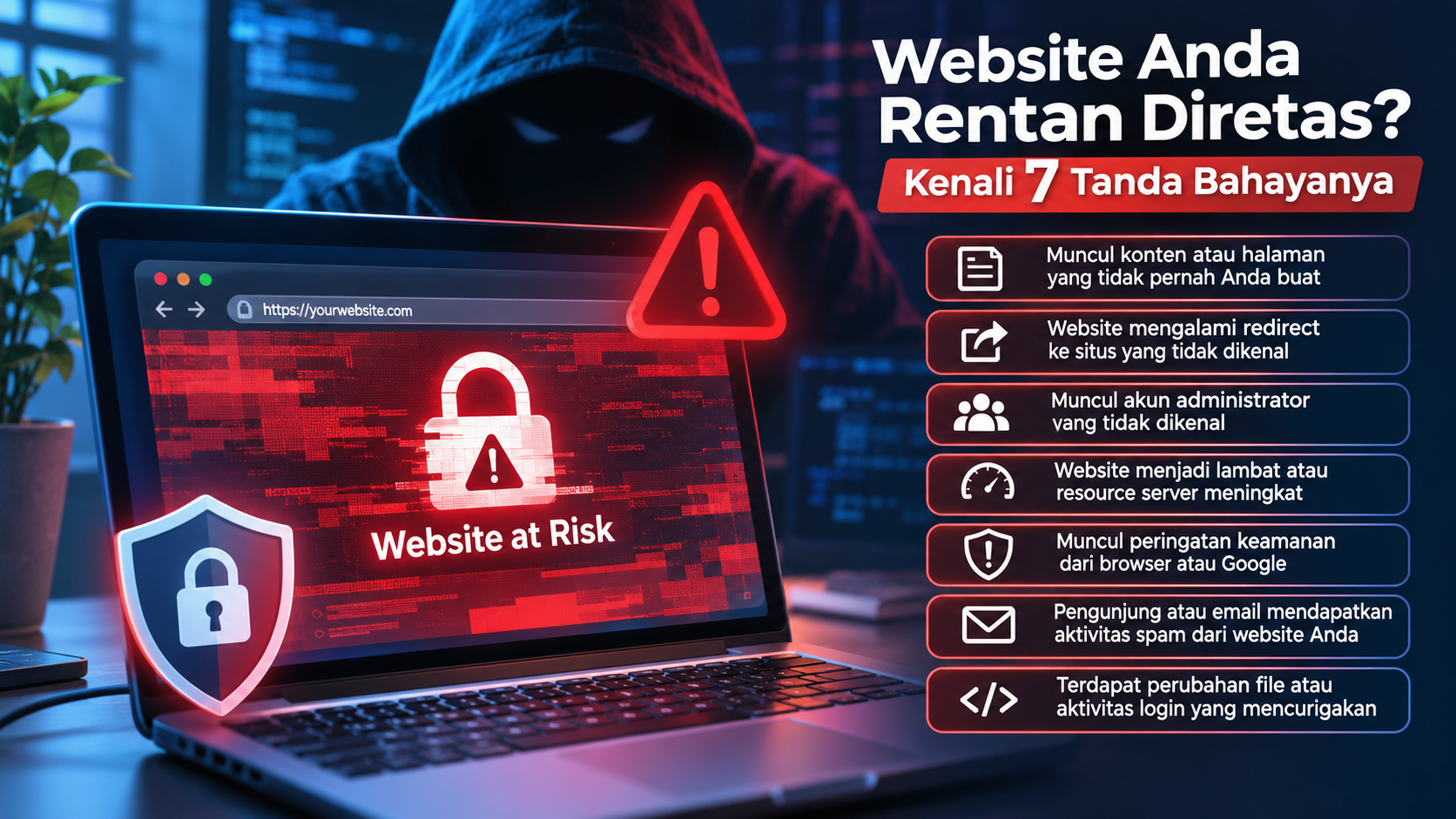
1. Unknown Content or Pages Appear on Your Website
One of the easiest warning signs to recognize is the appearance of content or pages that you never created.
For example, you own a company website, but suddenly discover pages promoting unfamiliar products, gambling services, or content unrelated to your business.
This may happen when attackers gain access to your website's administrator dashboard. Once inside, they can create new pages, modify existing articles, or insert unwanted links without your knowledge.
In some cases, attackers deliberately create these pages to appear in search engine results such as Google. Their goal is to take advantage of your domain's reputation to promote their own content.
What should you do?
-
Check recently created pages and articles.
-
Review administrator accounts.
-
Check suspicious login activities.
-
Inspect website files for unexpected changes.
-
Change administrator passwords if suspicious activity is discovered.
2. Your Website Redirects Visitors to Unknown Websites
Have you ever opened your own website only to be redirected to another website?
If this happens unexpectedly, you should investigate immediately.
Unwanted redirects are a common warning sign of a compromised website. Visitors may be redirected to advertising pages, gambling websites, phishing pages, or other malicious destinations.
Attackers often achieve this by injecting JavaScript code or modifying website files. The malicious code may redirect visitors based on specific conditions, such as their device, location, browser, or traffic source.
This can make the attack difficult to detect because the website may appear normal when accessed by its owner, while other visitors experience suspicious redirects.
What should you do?
-
Inspect JavaScript files and website configurations.
-
Check
.htaccesswhen using Apache. -
Review Nginx configuration files when applicable.
-
Examine recently installed plugins or extensions.
-
Scan the entire website for malware.
3. Unknown Administrator Accounts Appear
This is one of the most serious warning signs.
If your website uses a CMS such as WordPress, Joomla, or Drupal, check the list of users with administrator privileges.
If you discover an administrator account that you never created, someone may have gained unauthorized access to your system.
Why would hackers create additional administrator accounts?
Because these accounts allow them to maintain access to your website. Even if you change the main administrator password, they may still be able to log in using the additional account.
Simply changing your main password may not solve the problem.
What should you do?
-
Review all website user accounts.
-
Remove accounts that are confirmed to be unauthorized.
-
Check user roles and permissions.
-
Change administrator passwords.
-
Review authentication settings and configurations.
Make sure you also check whether unknown email addresses are associated with administrator accounts.
4. Your Website Becomes Slow or Server Resource Usage Increases
A slow website does not automatically mean it has been hacked. It could be caused by network issues, server configuration, database problems, or increased visitor traffic.
However, if your website suddenly becomes slow without an obvious reason, further investigation is necessary.
One possible cause is malicious activity running on your server.
For example, attackers may inject scripts that perform hidden tasks, such as sending spam, executing automated processes, or consuming server resources without your permission.
Here are some warning signs to watch for:
-
Unusually high CPU usage.
-
Unexpected RAM consumption.
-
Excessive PHP or Node.js processes.
-
Sudden traffic increases without marketing activities.
-
Frequent server timeouts.
What should you do?
-
Monitor CPU and RAM usage through your hosting panel.
-
Inspect running server processes.
-
Review access logs and error logs.
-
Check incoming server connections.
-
Contact your hosting provider or server administrator if you discover suspicious processes.
For VPS and dedicated server users, resource monitoring is an important part of maintaining website security.
5. Security Warnings Appear in Your Browser or Google
Have you ever encountered a warning such as "Deceptive Site Ahead" when visiting a website?
This warning should never be ignored.
Browsers such as Google Chrome have security systems that can warn visitors when a website is detected as containing malware, phishing content, or other harmful elements.
Google also provides Google Search Console, which can notify website owners about security-related problems.
Some possible issues include:
-
Malware detected on your website.
-
Phishing content hosted on your domain.
-
Malicious pages injected by unauthorized users.
-
Security problems that may affect visitors.
If your website receives one of these warnings, it does not mean you must abandon your domain. However, you should investigate the problem and remove its source as soon as possible.
What should you do?
-
Check the Security Issues report in Google Search Console.
-
Scan your website for malware.
-
Identify and remove malicious files or content.
-
Make sure all website pages are safe.
-
Request a security review through Google Search Console after resolving the problem.
6. Your Visitors or Email Accounts Receive Spam Messages
Imagine running a company website, but suddenly your customers report receiving suspicious emails pretending to come from your business.
Or perhaps your website starts sending hundreds of emails without your knowledge.
This may indicate that your website or email server has been compromised.
Attackers often use compromised websites to send spam, distribute phishing links, or perform other automated activities.
The consequences can be serious.
Your domain may end up on email service blocklists. As a result, legitimate business emails, invoices, and customer notifications may be delivered to spam folders.
What should you do?
-
Review email delivery logs on your server.
-
Check email accounts for suspicious activity.
-
Inspect PHP scripts responsible for sending emails.
-
Review SMTP configurations.
-
Check whether your domain appears on email blocklists.
-
Change email credentials if they may have been compromised.
You should also inspect your website for unknown scripts that automatically send emails.
7. Suspicious File Changes or Unusual Login Activities
The final warning sign involves unexpected changes to website files or unusual login activities.
For example, you discover new PHP files that you never created, modified configuration files, or administrator login attempts from unfamiliar locations and times.
Some attackers deliberately upload additional files known as backdoors.
What is a backdoor?
A backdoor is a mechanism that allows someone to regain access to a system without following its normal login process. This means attackers may maintain access even after the administrator changes their password.
Some important locations to inspect include:
-
The website root directory.
-
Upload directories.
-
Plugin and theme directories.
-
Configuration files such as
.env. -
.htaccessfiles. -
Unfamiliar PHP files.
-
Server cron jobs and scheduled tasks.
What should you do?
-
Check file modification timestamps.
-
Compare website files with original versions from their developers.
-
Review access logs and authentication logs.
-
Inspect unknown cron jobs.
-
Scan for malware and backdoors.
Do not immediately delete suspicious files without investigating them first. Some files may belong to legitimate applications. Always create a backup before making significant changes.
What Should You Do If Your Website Has Been Hacked?
If you discover one or more of the warning signs above, do not panic. However, you should not treat the situation as a minor issue either.
Here are some initial steps you can take:
1. Create a Backup
Before making changes, save copies of your website files, database, and available logs. These backups can help during the investigation process.
2. Restrict Suspicious Access
If an attack is still ongoing, consider restricting access to the website or enabling maintenance mode. For serious incidents, isolate affected systems to prevent the attack from spreading.
3. Change Passwords and Credentials
Change passwords for administrator accounts, hosting panels, databases, FTP/SFTP, SSH, and other services connected to your website. Perform these changes from a trusted device.
4. Scan and Remove Malware
Use security scanning tools to identify malicious files. Make sure you do not just remove the visible symptoms but also identify the original entry point used by the attackers.
5. Update Your System
Ensure your CMS, frameworks, plugins, themes, libraries, and server components are running supported versions with available security updates.
6. Review Server Configuration
Make sure sensitive files such as .env, .git, and other configuration files cannot be accessed publicly through a browser.
7. Verify Everything After Recovery
Perform additional tests, review logs, and make sure suspicious activities do not return.
If you do not have experience handling security incidents, consider contacting a server administrator or a professional website security specialist.
Tips to Protect Your Website from Hackers
Preventing attacks is always better than recovering from a compromised website. Here are some simple practices that can significantly improve your website security:
-
Use strong and unique passwords for every service.
-
Enable Two-Factor Authentication (2FA).
-
Keep your CMS, plugins, themes, and frameworks updated.
-
Remove unused plugins and themes.
-
Use SSL/TLS to protect data communication.
-
Perform regular backups.
-
Limit administrator access based on actual requirements.
-
Use firewalls and protection systems such as a Web Application Firewall (WAF).
-
Monitor login activities and file changes.
-
Make sure server configurations do not expose sensitive files.
Website security is not something you configure once and forget. It requires continuous monitoring and regular maintenance.
Conclusion
A hacked website does not always show obvious signs. In fact, some cyberattacks are deliberately designed to remain hidden from website owners.
Unexpected content, suspicious redirects, unknown administrator accounts, unusual server resource usage, browser security warnings, spam activities, and unauthorized file changes are all warning signs worth investigating.
Do not wait until customer data is exposed or your website becomes unavailable before taking security seriously.
If you manage a business or company website, make security part of your regular maintenance routine. A fast and attractive website is important, but a secure website is even more important for maintaining the trust of your visitors and customers.