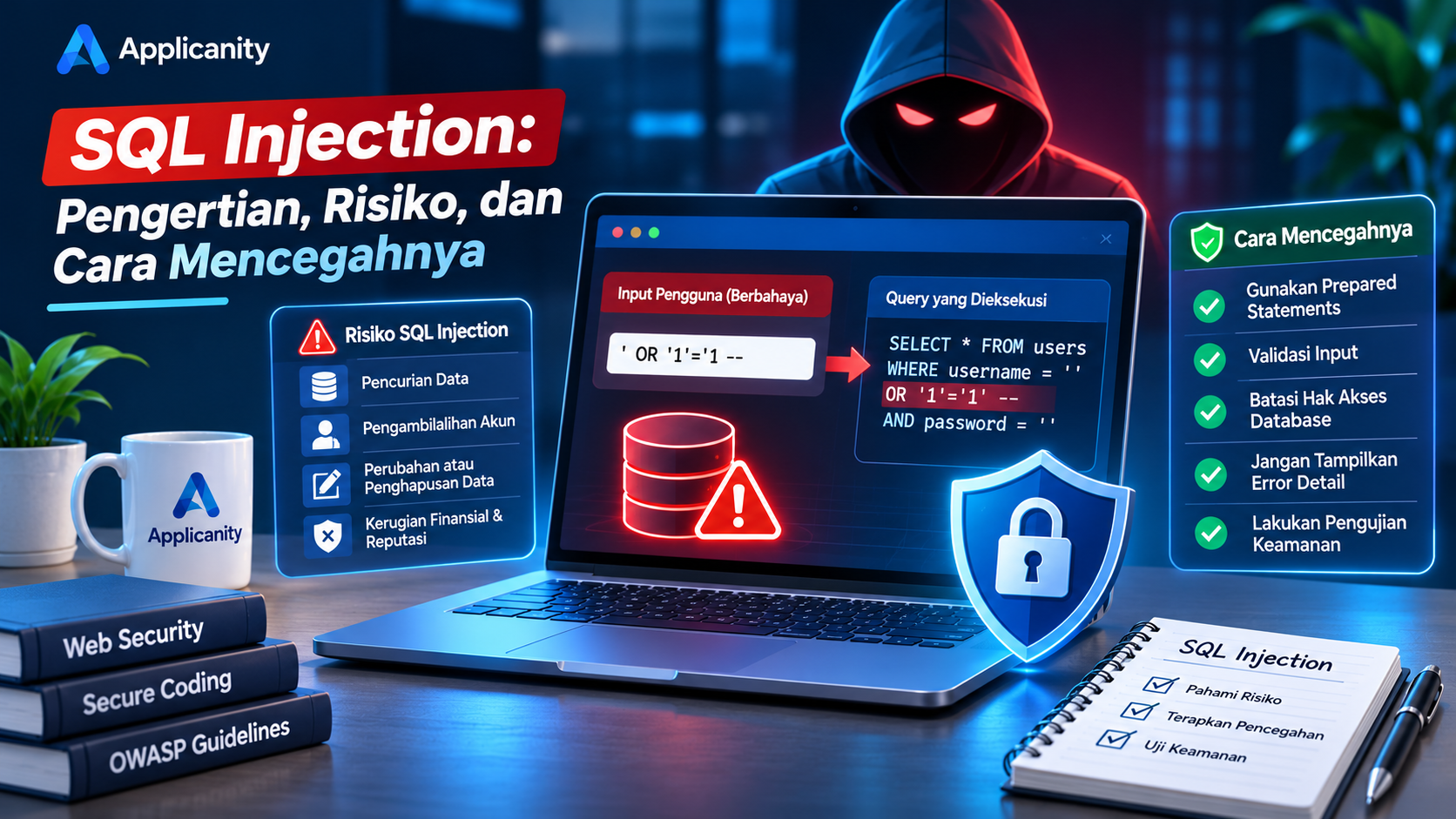
SQL Injection: What It Is, Its Risks, and How to Prevent It
Website security is one of the most important aspects of application development. Besides making sure a website works properly and has an attractive design, developers must also protect user information and application systems from security threats.
One of the most well-known attacks in web application security is SQL Injection.
SQL Injection is an attack technique that takes advantage of weaknesses in how an application communicates with its database. If a website does not have proper protection, attackers may attempt to manipulate the SQL queries executed by the application.
The consequences can be serious, ranging from user data theft and unauthorized data modification to gaining access to sensitive database information.
Fortunately, this type of vulnerability can be prevented by following secure development practices from the beginning.
In this article, we will explain what SQL Injection is, how it works, the risks it creates, and the best ways to protect your website against it.
1. What Is SQL Injection?
SQL Injection, commonly abbreviated as SQLi, is a type of security attack targeting applications that use SQL databases.
It happens when an attacker attempts to insert SQL commands or expressions through user input, and the application executes them without proper protection.
To understand SQL Injection, we first need to understand SQL.
SQL (Structured Query Language) is a language used to manage and retrieve information from databases. Some popular database systems that use SQL include:
-
MySQL
-
PostgreSQL
-
Microsoft SQL Server
-
MariaDB
-
Oracle Database
For example, when someone logs into a website, the application usually executes a query to find an account based on the username or email address provided.
If the application directly combines user input with an SQL query, an attacker may be able to change the intended meaning of that query.
This is the basic principle behind SQL Injection.
2. How Does SQL Injection Work?
SQL Injection usually takes advantage of applications that do not properly separate user input from SQL commands.
For example, a PHP application might contain the following login code:
<?php

$username = $_POST['username'];
$password = $_POST['password'];

$sql = "SELECT * FROM users
        WHERE username = '$username'
        AND password = '$password'";

$result = mysqli_query($connection, $sql);
In this example, the username and password values are directly inserted into the SQL query.
The problem is that the application does not properly separate SQL instructions from data provided by users.
If someone submits specially crafted input, the structure of the executed query may change.
For example, a query that should only search for an account using a username and password could potentially be manipulated so that its original authentication conditions no longer work as intended.
This may allow attackers to attempt to bypass authentication or access information they should not be able to see.
Why does this happen?
Because the application treats user input as part of the SQL command instead of treating it as ordinary data.
Developers must make sure that user input cannot change the structure of database queries.
3. Types of SQL Injection
SQL Injection comes in several forms, each with a different approach. Here are some important types developers should understand.
A. In-Band SQL Injection
In-Band SQL Injection happens when attackers use the same communication channel to send SQL instructions and receive the results.
This type is relatively easy to understand because the results of the manipulated query may appear directly in the application's response.
Two common forms include:
Union-Based SQL Injection
This technique uses the SQL UNION operator to combine results from multiple queries into a single result.
If an application is vulnerable, attackers may be able to access information from other database tables that should not normally be displayed.
Error-Based SQL Injection
This technique takes advantage of database error messages displayed by an application.
Detailed error messages may reveal information about the database structure, table names, or the database system being used.
B. Blind SQL Injection
Blind SQL Injection happens when an application does not directly display query results or database error messages but still provides responses that can be observed.
Attackers attempt to infer information by comparing differences in application behavior.
Common forms include:
Boolean-Based Blind SQL Injection
This technique takes advantage of differences in application responses when a condition evaluates to true or false.
For example, an application may display different results depending on whether a particular condition is satisfied.
Time-Based Blind SQL Injection
This technique uses database response times.
Attackers attempt to observe whether certain requests cause the database to respond more slowly under specific conditions.
C. Out-of-Band SQL Injection
Out-of-Band SQL Injection uses a different communication channel to retrieve information from a database.
This technique usually depends on specific database features and network configurations that allow external communication.
It is not always possible because it requires a supporting environment.
4. What Are the Risks of SQL Injection?
SQL Injection is not just a technical issue that developers need to understand. It can directly affect website owners, businesses, and users.
Here are some of the most common risks.
A. User Data Theft
One of the most serious risks is unauthorized access to information stored in a database.
This information may include:
-
Usernames.
-
Email addresses.
-
Phone numbers.
-
Profile information.
-
Transaction history.
-
Confidential business information.
If a database contains sensitive information and is accessed by unauthorized individuals, user privacy can be seriously affected.
B. Account Takeover
SQL Injection may be used to access authentication information or manipulate login processes in vulnerable applications.
If an attacker successfully gains access to an account, they may be able to perform actions as that account owner.
The consequences can be even more serious when administrator accounts are involved.
C. Data Modification or Deletion
Not every SQL Injection attack is intended to steal information.
In certain situations, attackers may attempt to modify or delete information stored in the database.
For example:
-
Changing user profile information.
-
Deleting product records.
-
Modifying product prices.
-
Removing transaction history.
-
Damaging business records.
These actions can disrupt business operations and cause financial losses.
D. Database Information Exposure
Detailed database error messages may reveal important information about the database structure.
For example, they may expose table names, column names, database types, or parts of the executed SQL query.
This information can help attackers understand the application and search for additional weaknesses.
E. Financial and Reputational Damage
When a website experiences a data breach, the business faces more than just a technical problem.
Website owners may also experience:
-
Loss of customer trust.
-
Business interruptions.
-
System recovery costs.
-
Potential legal obligations.
-
Financial losses.
-
Damage to company reputation.
This is why database security should be an essential part of every business security strategy.
5. How to Prevent SQL Injection
The good news is that SQL Injection can be prevented by following proper application development practices.
Here are several important steps developers should implement.
A. Use Prepared Statements
Prepared statements are one of the most effective methods for preventing SQL Injection.
They separate the structure of an SQL command from the data provided by users.
This means user input is treated as a data value rather than as part of an SQL command.
Example using PHP PDO:
<?php

$username = $_POST['username'] ?? '';

$stmt = $pdo->prepare(
    "SELECT * FROM users WHERE username = :username"
);

$stmt->execute([
    'username' => $username
]);

$user = $stmt->fetch();
In this example, the SQL query is prepared using a placeholder called :username.
The actual username value is then passed separately through execute().
This prevents user input from changing the query structure, unlike the previous example.
If you use MySQLi, you can also implement prepared statements:
<?php

$username = $_POST['username'] ?? '';

$stmt = $connection->prepare(
    "SELECT * FROM users WHERE username = ?"
);

$stmt->bind_param("s", $username);

$stmt->execute();

$result = $stmt->get_result();
Always use prepared statements when inserting user-provided values into SQL queries.
B. Validate User Input
Input validation ensures that data received by an application follows the expected format.
For example:
-
Email addresses should follow a valid email format.
-
Phone numbers should contain acceptable characters.
-
User IDs should be positive integers.
-
Dates should follow the expected format.
-
Text length should stay within defined limits.
Example of simple PHP validation:
<?php

$userId = filter_input(
    INPUT_GET,
    'id',
    FILTER_VALIDATE_INT
);

if ($userId === false || $userId === null || $userId <= 0) {
    die("Invalid ID");
}
Input validation helps maintain data quality and prevents unexpected values from being processed by the application.
However, validation alone is not enough to prevent SQL Injection. You should still use prepared statements when communicating with databases.
C. Restrict Database Permissions
Do not use a database administrator account for every application operation.
If your website only needs to read and modify certain data, grant it only the permissions required for those tasks.
This principle is known as the Principle of Least Privilege.
It means that every application or user should receive only the minimum permissions necessary to perform its responsibilities.
For example:
-
A website application does not always need permission to create new databases.
-
An account that only reads data should not have permission to delete tables.
-
A dedicated backup account should receive permissions appropriate for backup operations.
By limiting database permissions, you can reduce the potential impact if an application is compromised.
D. Avoid Displaying Detailed Database Errors
When database errors occur, avoid displaying technical information directly to website visitors.
Examples of information that should not be publicly displayed include:
-
Executed SQL queries.
-
Database table and column names.
-
Configuration file locations.
-
Database usernames.
-
Internal server information.
Instead, display a general message such as:
"Something went wrong. Please try again later."
Store detailed error information in internal logs so developers can investigate the problem.
E. Use an ORM or Query Builder
ORM (Object-Relational Mapping) and Query Builder tools help developers interact with databases through more organized structures.
Several frameworks provide these features, including:
-
Laravel Eloquent.
-
Yii2 Active Record.
-
Symfony Doctrine.
-
Django ORM.
-
Sequelize for Node.js.
Example using Laravel Eloquent:
<?php

$user = User::where(
    'email',
    $request->email
)->first();
When used properly, these tools help developers manage query parameters safely.
However, using an ORM does not automatically guarantee that an application is free from SQL Injection. Developers must still be careful when using raw queries, manually constructed SQL statements, or features that directly insert user input into SQL.
F. Avoid Concatenating User Input into SQL Queries
Never build SQL queries by directly combining strings that come from users.
Example of risky code:
<?php

$sql = "SELECT * FROM products
        WHERE name = '$productName'";
If you need dynamic queries, use parameter binding for data values.
For table names, column names, or SQL components that cannot be represented by ordinary parameters, use a predefined allowlist.
For example, if users can choose how products are sorted, restrict the available options to approved columns such as name, price, or created_at.
G. Perform Security Testing
Do not only test whether your website features work as expected. Developers must also make sure the application does not contain security vulnerabilities.
Here are some recommended activities:
-
Test login forms for security issues.
-
Review all search features.
-
Check input forms and data filters.
-
Test database query handling.
-
Use security testing tools such as OWASP ZAP.
-
Perform code reviews before publishing the application.
Security testing should only be performed on systems you own or systems for which you have official permission to conduct testing.
6. How to Identify a Website That May Be Vulnerable to SQL Injection
Not every website affected by SQL Injection will display obvious warning signs.
However, there are several indicators that may suggest your application needs further investigation.
A. Database Error Messages Appear
If your website displays database error messages when users submit certain inputs, developers should investigate how those inputs are processed.
Error messages containing technical details may indicate that the application is not handling database errors properly.
B. Unexpected Search Results
If a search feature returns unusual results that do not match the submitted input, review whether the underlying SQL queries are constructed safely.
C. Unusual Database Activity
Monitor database logs for unusual activity, such as unexpected queries, repeated access attempts, or abnormal increases in database usage.
D. Security Testing Reports Vulnerabilities
Use application security testing tools to identify potential issues in endpoints that accept user input.
One useful reference is the OWASP Web Security Testing Guide.
Remember that the absence of visible warning signs does not guarantee that a website is secure. Code reviews and security testing are still necessary.
7. Use OWASP as a Website Security Reference
OWASP (Open Worldwide Application Security Project) is an organization that provides guidelines and resources for improving application security.
One of its most popular references is the OWASP Top 10, a list of important web application security risk categories that developers should understand.
SQL Injection was included under the Injection category in the OWASP Top 10 2021. In the OWASP Top 10 2025, injection risks continue to be relevant through OWASP's application security guidance and resources.
Developers can use OWASP documentation to learn about different attack types, secure coding practices, and application security testing methods.
Some useful resources include:
-
OWASP Top 10.
-
OWASP SQL Injection Prevention Cheat Sheet.
-
OWASP Web Security Testing Guide.
-
OWASP Application Security Verification Standard (ASVS).
Understanding security standards such as OWASP can help developers build safer and more reliable applications.
Conclusion
SQL Injection is an important security threat that every developer working with databases should understand.
This attack happens when an application fails to properly separate user input from SQL commands. If successfully exploited, SQL Injection can lead to data theft, account takeover, unauthorized information changes, and database damage.
Fortunately, these risks can be reduced by following secure development practices.
Use prepared statements, validate user input, restrict database permissions, avoid exposing technical error messages, and perform security testing regularly.
The most important thing to remember is that security should never be treated as an additional feature that developers think about only after a website has been completed. It should be part of every stage of application development.
By applying secure coding practices from the beginning, developers can build websites that are safer, more stable, and more trustworthy.
Build Secure Websites with Applicanity
Applicanity helps businesses build websites and applications with a focus on development quality, performance, and system security.
We believe a good website is not just about attractive design and complete features. It should also have a strong technical foundation that protects data and supports long-term business needs.
Visit Applicanity to learn more about our website development and digital solution services.